
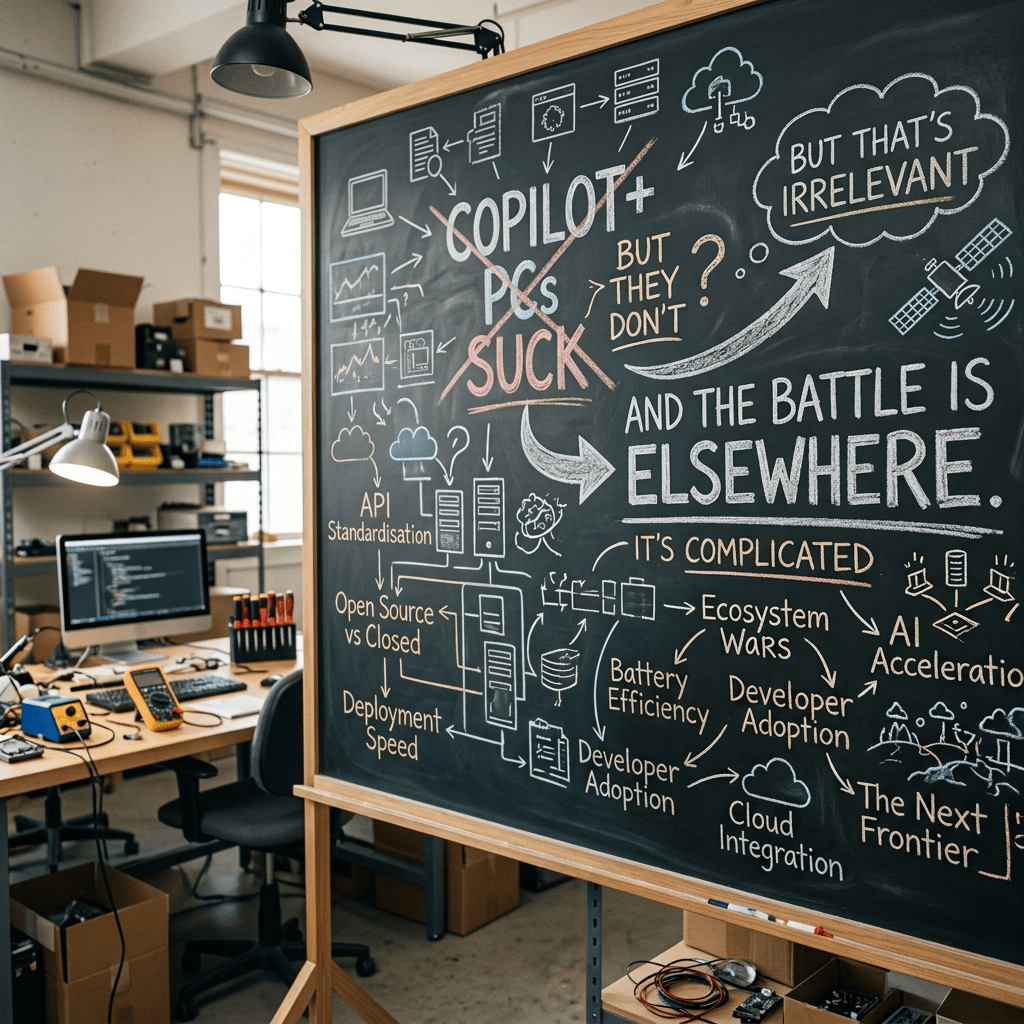
I’ve spent a fair amount of time working with Copilot+ PCs (ignoring the Copilot PCs that came before them, with an over-hyped Copilot keyboard button), both the ARM64 flavors and the x64 equivalents that came later. While they offer some nice features, the overall experience is underwhelming — not because they are bad PCs, no, they’re great PCs with specs that I can appreciate. There are challenges:
- The Copilot+ PC doesn’t do Copilot, because (at least at this point in time) Copilot is a cloud-based service.
- People expect more from AI that a few features that leverage this extra silicon. A Copilot+ PC is not going to offer an OpenAI/Claude/Gemini/Copilot chat-based experience, it’s just not powerful enough.
- The marketing hype is overblown and used to justify (in many cases) a more premium device with a price to match (which cloud-AI made much worse due to silicon capacity constraints driving up prices on everything).
But there are some redeeming qualities of the devices that shouldn’t be overlooked, going back to the original vision of the first NPU-powered Windows devices that came out in 2020: “Accelerate AI/ML workloads.” We’re not talking LLMs here, we’re talking about more special-purpose ML models that are now all lumped into the generic (and mostly meaningless) AI bucket.
So what are these AI/ML workloads? Let’s look at a few.
Windows Studio Effects
This is where it started on the original Surface devices that included Snapdragon CPUs with NPUs. Features included background effects (blurring or removal/replacement), eye contact (a bit creepy), and voice focus (noise cancellation) that were efficient enough to run all the time on a laptop. For those who live in Teams, that’s a good feature.

Later silicon added more “TOPS” (not a very meaningful measure) and more features to go along with it, including portrait lighting and some (kind of silly) creative filters. Because people want to look silly on Teams.
Recall
It feels like this is when things went off the rails. “Let’s build a feature that records everything you do on your PC and makes it searchable.” Basically, it captures screenshots and uses AI/ML to read the text, and makes that all searchable.
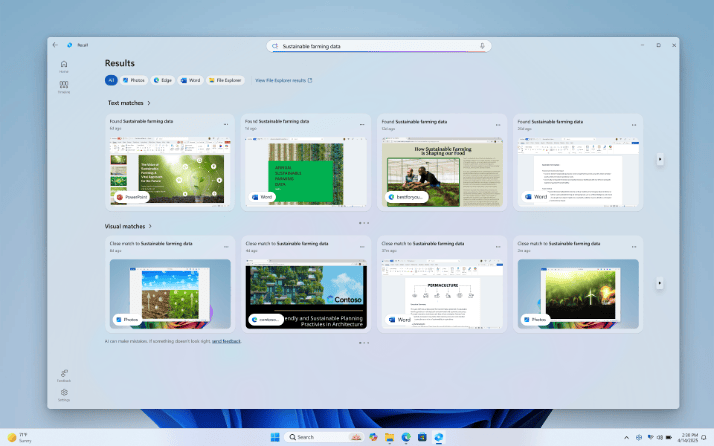
I’ve used it some (forcing myself past the creepiness of being watched all the time) and generally didn’t find it that useful. Your mileage may vary. But as has been seen, this is not a feature that is going to sell Copilot+ PCs, no matter what Microsoft thinks.
Click To Do
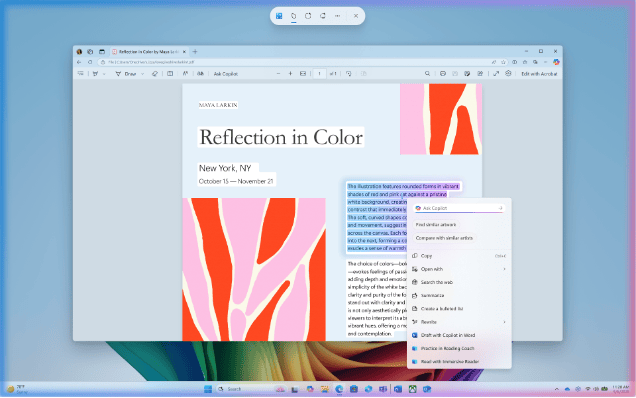
Interestingly, this is a subset of Recall. Instead of building a database of screenshot data, Click To Do just captures the screen and turns all the text on it into blocks that you can do things with — just press the Windows key and click on something. Super-simple and if you remember it is there it can be useful.
Live Captions
A useful concept: listen to the audio coming from the PC, convert it to text, and even translate it between languages at the same time. More AI/ML-focused functionality. It’s still somewhat limited on the language front: there is a list of supported languages, and an even smaller list of languages that can be used for translation from one of those supported languages, but it still useful as an accessibility feature.

Semantic Search
Why is it so hard to put a search mechanism into Windows that can actually find things in files? It’s something Microsoft has tried with just about every major Windows release, and something that people are generally disappointed in with each release. But combine it with some AI/ML logic, including a “small” language model that runs locally on Windows, and search actually begins to work.
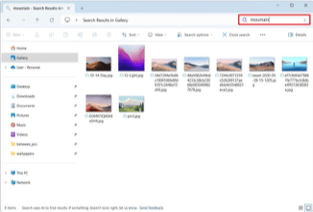
Of course they then try to make it even fancier, e.g. searching in Settings, which I’ve found to be hit-and-miss. But overall, there is hope.
Paint
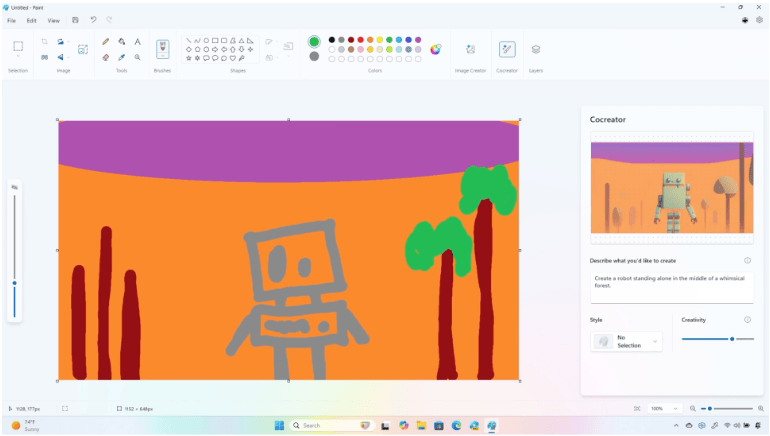
Sigh, here’s another example of “why bother.” There aren’t that many people that use Paint overall, and those that do aren’t typically using it for AI-driven image editing. But if you want to remove backgrounds, do generative fill to extend an image (e.g. take a 4×3 and turn it into a 16×9), or even have it generate an image based on your crude art skills, fine, it can do those things.
OK, any other downsides?
Let’s talk about the bulk. Even these limited models used to implement these AI/ML features, these take up a lot of disk space. And if/when Microsoft updates the apps and the models they use, there’s a network bandwidth impact as well.
So how big are these? First, there are 3GB of shared models and runtime engines managed by and used by Windows.
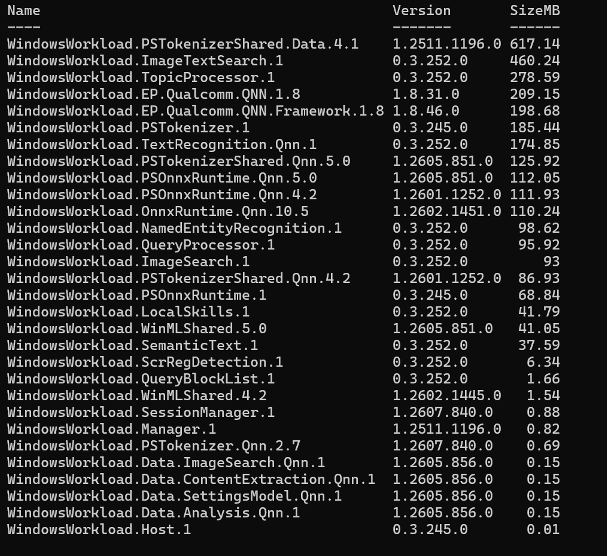
OK, that’s not awful. But wait, there’s more. Then we have one that is named differently and is 7GB:

Yes, that’s for Paint. And it’s almost as big as a Windows 11 image. Total those up and we’re talking about doubling the size of Windows 11 for AI stuff that you might never use. I don’t mind “big” but there’s no reason for this to be there by default — if I want to use it, download it and install it, treat it as an optional feature or a store app that’s not preinstalled, or something other than preinstalling it.
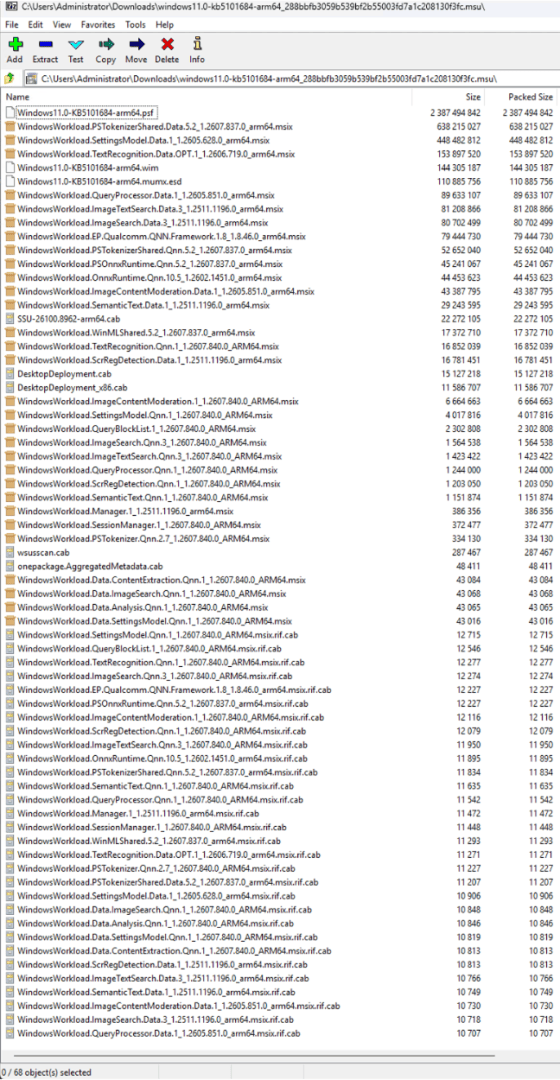
And for whatever reason, these models and runtimes are included in the monthly cumulative update each month, so if you are using SCCM or WSUS you’ll feel the pain.
Anything else?
Of course there is. All of these features are designed to highlight the capabilities of the NPU. But let’s say you have a good GPU in your device (either in a desktop PC or in a laptop). These can have 100x the AI/ML performance (ugh, “TOPS” again). Granted, they aren’t as power-efficient, but if this is something you don’t do routinely (e.g. Paint) do you really care? Just let me do it with the GPU. Nope, not an option. Microsoft purposely limits these to Copilot+ PCs using the NPU; it won’t use the GPU. The models and runtimes even support falling back to using the CPU, which would hurt performance quite a bit, but for some of these features that might be OK.
I see this as a product limited by the marketing: we want to sell Copilot+ PCs with NPUs, so we won’t use GPUs even though they could do the same thing.
So why doesn’t this matter?
It seems that even Microsoft and the OEMs have realized that Copilot+ PCs aren’t getting anyone excited. And something new is: even higher-end devices, those that can run local LLMs to do workloads that previously could only be run in the cloud or with a high-end GPU. Zac Bowden’s article on Windows Central explains it well.
Now we have devices like the AMD Ryzen AI Halo-based ones (from AMD and OEMs such as Lenovo, Dell and HP) and the Nvidia RTX Spark-based devices from just about every OEM. They will be expensive, from “a few thousand” dollars on up, depending on how much RAM you want to put into one. But they will be much more capable of doing “real work” without the cloud, running GPT/LLM models locally. (Microsoft is announcing their Surface device with the RTX tomorrow, so we’ll see just how bad.) And yes, these all meet the Copilot+ PC specs, but as Zac said, they probably won’t stress that at all.
Will these sell lots of machines? Not at those prices. But they will be popular with developers and others that want local AI compute power.
What’s the real battle?
It’s one thing to put AI features into the OS. It’s a completely different battle to get developers to write apps that leverage the AI capabilities in Windows hardware. That’s (another) threat to the Windows platform. Microsoft has been working on a variety of options to enable Windows in this space:
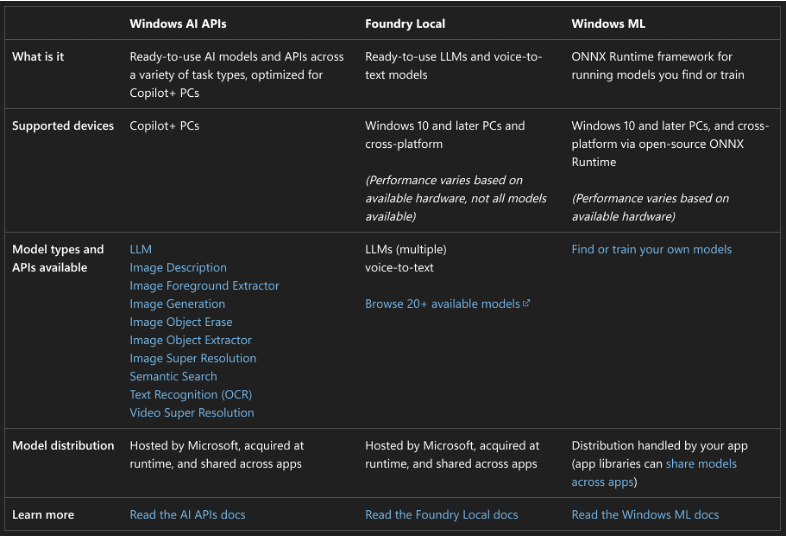
Deciphering these is not simple. My take:
- Windows AI leverages the same models and capabilities that the in-box apps use, with all the models and runtimes mentioned previously, but these need a Copilot+ PC NPU (artificially).
- The other two can run an assortment of models using the CPU, NPU, or GPU — as an app developer you can choose. (What’s the specific difference between the two? Not clear to me, need to spend some time writing code. Maybe in the coming months…)
The Onnx runtime mentioned is particularly interesting: you can have models (including LLMs) that can be used with “execution adapters.” Windows has adapters for the NPUs, for GPUs, and for the CPU — same model, just processed differently.
The real battle then is preventing dominance by some “other” API. Onnx is a Microsoft open-source project that is cross-platform, but will it take hold? The alternative is for people to write software directly to Nvidia’s CUDA interface, which then provides lock-in so that people continue using only Nvidia’s GPUs. In the long run, that’s not great (unless you’re an Nvidia shareholder).
It feels like Windows doesn’t have the momentum it needs here, but let’s hope there is more effort being put into it.
In case you want to play with the Windows APIs, there is a “Foundry Toolkit for VS Code” extension that you can add to Visual Studio Code. Once added you can download one or more Foundry Local models and run them locally — if you have the resources necessary on your computer. At a minimum, you need plenty of RAM, but a GPU is also recommended.
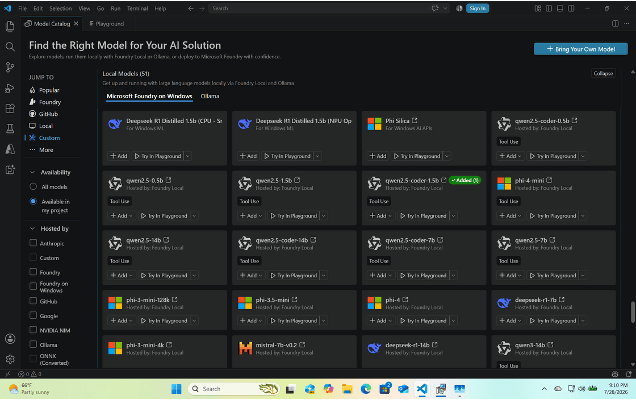
Just download one of the Foundy Local models, create a “Playground” to chat with it, and start playing.
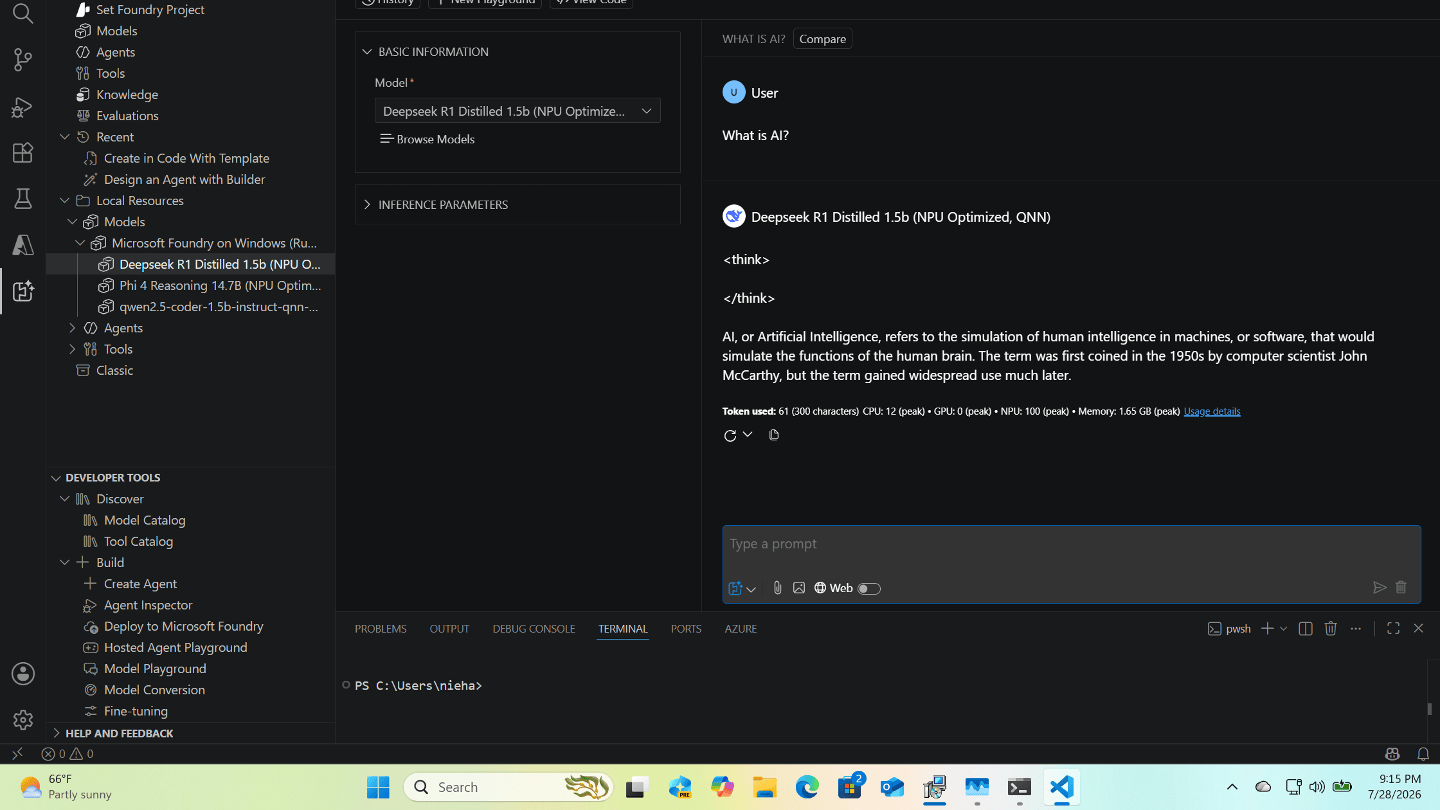
With my Lenovo ThinkStation P620, an Nvidia GeForce 5060 GPU, and a lot of RAM, there are lots of models that I can run. Check out https://www.canirun.ai/ for guidance for what your device can run well.
Overall, this is still early in a very rapidly changing space. Cloud-based AI is still in the lead today, but I do expect that to shift over time so that local AI is much more popular too — and more capable than Copilot+ PCs could ever be.





Leave a Reply