

As I do a lot of bare metal deployments, I routinely download the latest Windows 11 ISO from https://my.visualstudio.com (subscription required, you can also get them from https://admin.microsoft.com with other subscriptions). And it never fails, they keep getting bigger. Look at the five that I have on hand:

All of these are “Hudson Valley” releases, starting with 24H2 from November 2024 and working up to 25H2 from July 2026 (this month). And since Windows 11 26H2 is going to be an enablement package (just like 25H2), this is likely just going to keep growing for the next 15 months or so, until Windows 11 27H2 comes out (although that might be wishful thinking too).
Let’s compare from 2024-11 to 2026-07 just to see the difference.
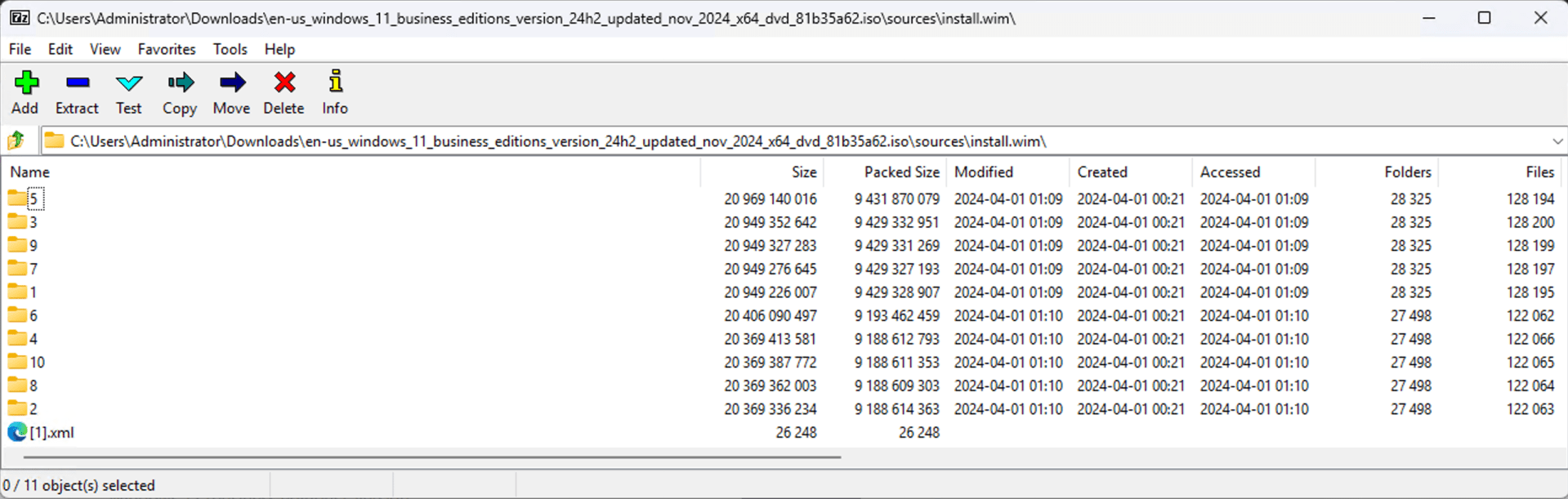
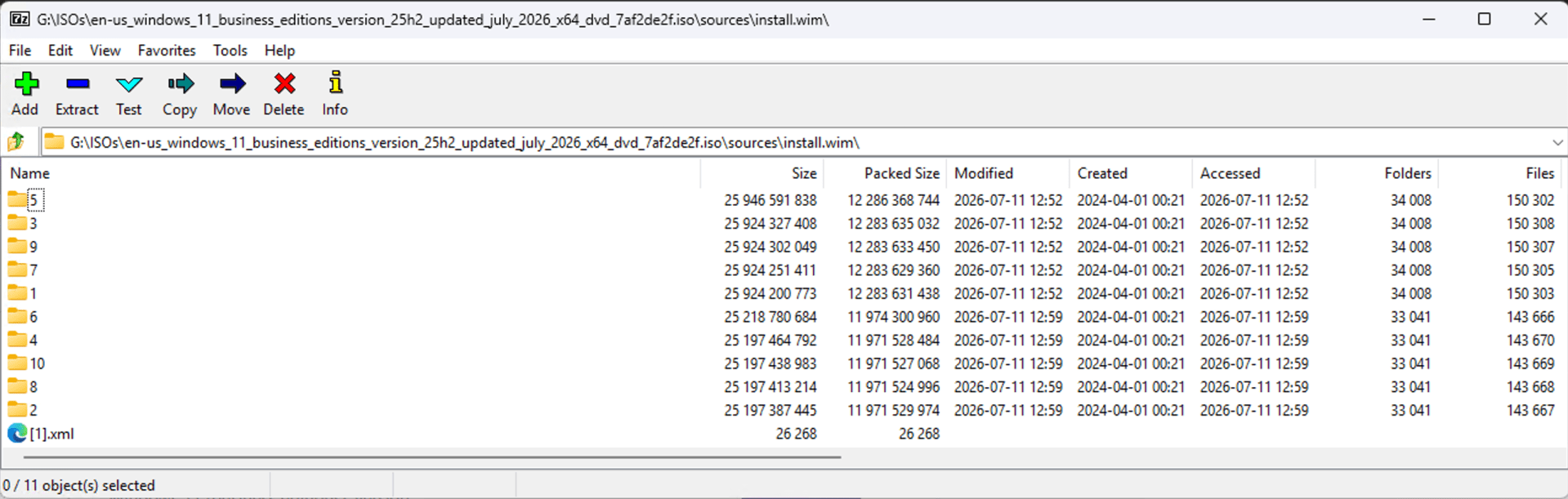
So there are almost 6,000 new folders and over 20,000 new files added in that period of time.
We’re looking at 10 different images in both INSTALL.WIM files (in the ISO), so you might think “what if I just export the one I want, index 3 for Windows 11 Enterprise”? That helps some, but it still shows a big difference, with the 2024-11 exported WIM at 5.1GB and the 2026-07 exported WIM at 7.4GB.
So is there anything you can do about that? Not really. Trying to remove things and then capture a new image will result in a bigger image, not a smaller one (I’ve tried). The one thing that would work is using solid compression, i.e. an ESD file like what is provided via Windows Update. That would shrink the image by over a gigabyte, so it would be right around 6GB. But you then need a deployment tool (e.g. DeployR) that is able to easily deploy such an image.
The only thing we can hope for is Microsoft creating a more modular OS that installs less by default, with optional components that can be downloaded and installed as needed. (It’s not like that hasn’t been done before, e.g. .NET Framework and RSAT, language packs, etc. — the technology exists.)
And please, give up on using 64GB drives with Windows 11 (even though Microsoft says that is the minimum system requirement). At this rate, you’re going to need it just for the OS…





12 responses to “How can Windows 11 keep getting bigger?”
Fantastic insights, as always!
…thats just messy
#digitalclutter
LikeLike
I can confirm your findings as I have noticed the same thing long time ago. So you are slo using 7-Zip to open ISO files like me 🙂
I noticed the size increase since last year. We are on Windows 11 24H2 and in few months we are going to deploy Windows 11 25H2. Or salvation is the enablement package which will flip the hidden and sleeping Windows 11 25H2 bits converting 24H2 to 25H2 in almost no time.
The irritating thing about this is that you cannot perform offline servicing on a Windows 11 image anymore like we used to do with Windows 10. Every time you need to deploy a newer version of Windows 11 that includes the monthly updates, you must download the new ISO from the volume licensing. You cannot perform offline servicing by downloading the latest monthly update using DISM anymore.
This is irritating as in our case we must add around 30Mb of RAID drivers and few network drivers to our images, WinRE, and WinPE, as DELL devices come using RAID configured by default and not AHCI. This means that resetting the device from Intune is a nightmare as WinRE most probably will not contain the necessary RAID driver to wipe the device, hence we need to service WinRE as well. You might say that the image would get the original size + 30 MB, but this is not true at all, the image, even a single indexed image increases by about 200 MB!!!!!
I also tried creating a custom ISO by removing the other indexes leaving the Professional version alone, but that did not help much, around 200Mb more or less to the original ISO. Even using /RESETBASE option with DISM does not help when creating a single indexed ISO. None of the DISM options helped to reduce the size, I have tried as well with no luck.
A week ago I tried to manually download the 2026-07 Windows 11 24H2 update, and to my surprise it was over 5GB (I must quote John Malkovich here). Heck the update itself is over 5GB!!!! (John Malkovich again). Over 5GB for an update? What the heck does it contain? Does it also include 25H2 binaries?
I guess that with the monthly updates, Microsoft is also including the Windows 11 25H2 binaries (or whatever is next) in the monthly updates so that whenever you decide to install the enablement package, you have already everything you need locally and with a small KB file the bits are flipped and you are on the next Windows version.
SCCM is becoming less and less useful, as you cannot load your ISO and let it perform offline servicing automatically for you whenever a new update is out like with Windows 10. This is really a shame and a lame as well.
LikeLike
26H2 will be an enablement package as well, so another reason to celebrate. But that also means the growth will continue…
I’m not sure why offline servicing wouldn’t work any more, but then again I haven’t tried it in a while as it is easier to grab the latest ISO, and you end up with a smaller WIM that way too.
LikeLike
That is true only if you have no customization of your WIM!
LikeLike
Most people have given up on custom images and just use the MS WIM, layering everything else on top after the OS is installed. It avoids lots of headaches, but does slow the whole process down.
LikeLike
Ah by the way, I wish someone from Microsoft sees my comment here…
Other than re-re-re-quoting John Malkovich…
Why would Microsoft still create variants of Windows 11 like Professional, Enterprise, Home, etc??? This is a nightmare. Microsoft, please, if you are reading this comment, PLEASE, create ONE Windows version, only 1, no Home, no Professional, no Enterprise, nothing but WINDOWS. Is this difficult?
We started imaging our systems with Windows 11 Professional and with the Intune user licensing, Windows is then converted to Enterprise, but this is a deep fake elevation as there are some Intune policies that get rejected by Windows 11 client itself as it only applies to the Enterprise version and not the Professional version even if Windows itself is elevated to Enterprise through the licencing! This is a problem that is killing us and creating tons of frustrations to us. Windows itself rejects the policy as it thinks it is a Professional version rather than an Enterprise version, even if the licence has been successfully applied to the user elevating it to Enterprise. While monitoring the deployment of some scripts and policies, we noticed tons of errors. Digging deeper, we found that Windows itself is rejecting the policy as it thinks it does not apply to it as it is a Professional version rather an Enterprise version even though the device has been successfully elevated to the Enterprise version using the licensing from Intune
ONE VERSION OF WINDOWS and to hell with the other versions! Is this difficult to achieve? This would reduce device management a lot!
LikeLike
There is one simple reason: money.
LikeLiked by 1 person
Still looks better compared to latest iOS updates, because the 64 GB version of iPhone just do not have enough free space to new updates to even download, not mention to install. System occupied space just growing and growing.
LikeLike
No device can make due with 64GB any more. I wouldn’t want to use a device with less than 512GB (although I could probably get by with less on an iPad).
LikeLike
That’s what happens when you stuff 3 different versions of Edge Chromium, use psfx delta to update Defender inbox definitions and OneDriveSetup.exe (where the deltas are as big as full files).
not to mention the CBS change introduced with build 26100 which dictate that each inbox component should keep a lower version staged as baseline.
they were hoping that would solve psfx deltas updating errors, but we know that’s another failed strategy, and in-place upgrade is the only reliable solution for such errors
LikeLike
The rreason why we still need to customize the WIM is one terrifying word: ‘WIPE”
Our HW vendor is DELL, and they provide us with laptops with the OS already built and the HW hash uploaded to our tenant. These laptop devices come with Windows 11 already pre-installed and we need to perform the Autopilot process. The process works fine, but for complete testing we tried to wipe those devices from Intune and discovered that:
This kills the concept of wiping a device especially those stolen as you have no guarantee it will ever work. This is a huge issue for our security requirements hence we do not trust DELL or any vendor as we need a WinRE that definitely contains the drivers for the local disk
Needless tto say that you cannot change this setting from the BIOS without rebuilding the computer which defies the concept of the vendor building the device and sending it to the user/IT department to build it with Autopilot!
This is why we still have a break the glass TS to re-build the devices and we need a custom image. It is hard to convince the vendors to deliver a laptop configured as AHCI rather than RAID. We tried, it worked for some time but they keep making mistakes and those are not tolerable here.
We ccreated a custom WINRE and deployed it to all devices as a workaround. WinRE image of Windows 11 is the only image that can be serviced (using SAFE OS update from Microsoft). The other images like the Windows WIM or BOOT WIM are not serviceable anymore in Windows 11.
LikeLike
It is possible to change from RAID to AHCI, but it does require doing so very carefully to prevent a bluescreen.
You should also be able to ask Dell to ship devices with RAID off.
LikeLike