
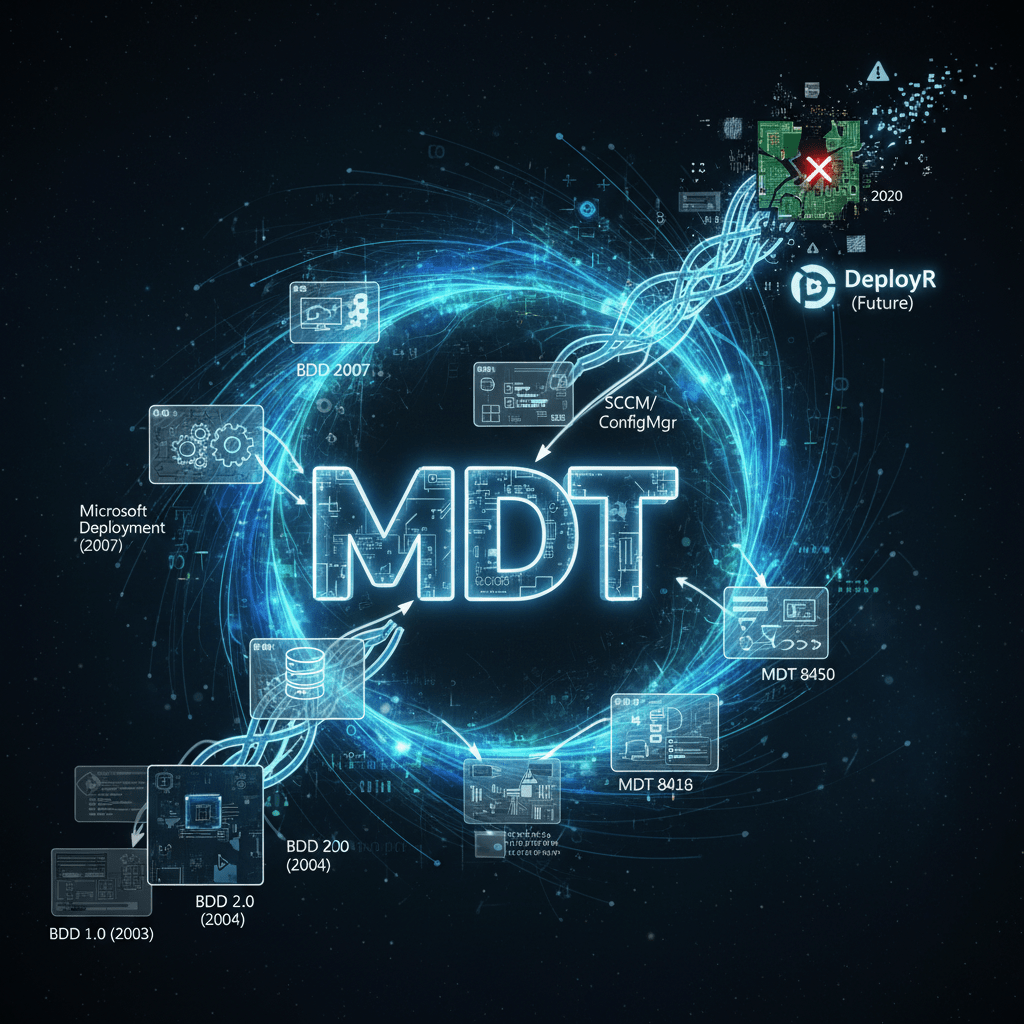
Way back in 2008, I published a blog post (now captured by the Wayback Machine) that gave a concise history of BDD, now known as MDT. Eighteen years later, I can now complete that story and expand on some of the items in more detail. (I will refrain from getting too carried away, hence the “abridged” part of the title, because you probably don’t care to read a small novel.)
So let’s start from the beginning:
Business Desktop Deployment 1.0, released in August 2003. This was the first version of BDD released to the public, based on work done by Microsoft Consulting Services. It consisted of guidance, batch files, and simple scripts and requires lots of hand-tweaking to create and deploy Windows 2000 and XP images.
This came out while I was still working in IT, working on a project that was deploying Windows en mass to a large number of brand new PCs. I wasn’t working with BDD myself — I had the challenge of implementing SMS — but others on the team were intimately familiar with it.
In late 2003, I became an MVP for SMS 2003 and asked Microsoft about a job on the team. Nothing came of those conversations, so I was pursuing other options as well, including a job with Microsoft Consulting Services. When I initially talked to them, they said “we don’t have any SMS jobs right now, but what do you know about Windows deployment?” So, I had about 3 days to learn everything I could about Windows deployment and BDD 1.0, then flew to Redmond for an interview where I spent a good portion of the time complaining about BDD, and laying out Windows deployment project plans on a white board. I thought it went reasonably well (although I still have nightmares about a conversation around advocating for kids soccer fields — the joys of MS interview loops). I flew back home the next day, and while driving back home from the airport I got a call offering me a job in Microsoft Consulting, which I accepted.
Before I made it home (it’s only a 40-minute drive), I got another call from Microsoft, this one asking if I was still interested in jobs on the SMS team. I had to tell them politely that I had already accepted a job at Microsoft.
Windows Server Deployment 1.0, released October 2003. This was a quick reworking of BDD 1.0, to support deploying Windows Server 2003.
Basically, this was mostly a change in the documentation. Deploying a server isn’t quite the same as deploying a desktop or a laptop, so you needed different project plans for that. But there wasn’t much interest in this one.
I started working at Microsoft in January 2004 and found myself quickly shipped off to Saudi Arabia to help a customer implement SMS 2003 (remember, I was hired to do Windows deployment, not SMS — but big customers can ask for favors, and soon I was on a plane). While in Saudi Arabia, I saw an internal e-mail asking for someone to help support beta customers who would be testing BDD 2.0. I volunteered and interviewed with the BDD team (middle of the night Saudi time) and was accepted — still working for MCS, but with the BDD team paying for my consulting times through internal funding (not an unusual arrangement at the time).
After I got back from Saudi Arabia, I made another trip to Redmond to meet the BDD team. Basically, there were a couple of architects (you’d probably call them product managers today), two other MCS people, an offshore testing team (vendor), and a remote documentation team (more vendors). And one of those other MCS people was being pulled off to work on a more important customer project, and the other was new, like me.
So you might ask, where are the developers? Well, basically the MCS person who was being pulled off was the developer. Granted, he was working primarily with VBScript and batch files, not “real code” at this point. So I quickly found myself filling in: doing development at home, in airplanes, and at customer sites.
Business Desktop Deployment 2.0 (Standard and Enterprise), released in November 2004. This was a major update to BDD 1.0, adding hypertext application (HTA) configuration support, a precursor to today’s task sequencing engine (actions), more VBScript and fewer batch files, and simpler installation. Also added was a new rules engine for performing data-driven deployments, a Zero Touch Installation mechanism to extend the capabilities of the SMS 2003 OS Deployment Feature Pack that was released at the same time, and Windows XP SP2 guidance and support.
While this still looked nothing like the MDT releases you’re used to today, it also moved away from the awful batch file-based processes that were used to configure BDD 1.0 (where if you answered something wrong you basically had to start over).
The ZTI piece for SMS 2003 and the rules engine were things that the other MCS person had started; I just finished them. I also created the first HTA apps, because at the time we weren’t allowed to write “real code” (e.g. C#) so HTA and VBScript was what we could manage.
The “action” capabilities were the first step toward a task sequence, basically realizing that it was way too complicated to have one script doing a whole bunch of things; we needed something more modular so that you could break things up into smaller scripts that you could then verify separately. So while you’d look at this and say “this is crude” compared to task sequences, it was the first big step in that direction.
Business Desktop Deployment 2.5 (Standard and Enterprise), released in August 2005. This was an evolutionary release, building on top of the BDD 2.0 release. This was the first release that supported x64 versions of Windows, and the last release that supported third-party imaging tools.
I continued working on BDD 2.5 remotely, still as an MCS consultant being paid by the BDD team (who were part of the Windows Server marketing organization, but funded by the Windows client marketing organization — a small engineering team in the middle of a sea of marketers). But I was also doing work with other customers, and it seemed none of them were close to home (Houston), which was getting draining. So I started looking for new jobs inside of Microsoft. I applied for a program manager job on the SMS team (again) and went back to Redmond for an interview loop. In typical Microsoft style, they did something weird: they interviewed me for two jobs at once, one that I did want (feature PM) and one that I most certainly did not want (partner program PM). Not surprisingly, the person on the interview loop responsible for the job I didn’t want voted no, and most Microsoft hires need a unanimous yes, so I didn’t get either job.
So I walked across the stree to the building the BDD team was in. They weren’t aware that I was interviewing or that I wanted to move to Redmond. So, even after being turned down for one jobs (well, two jobs), I was offered a new one on BDD team less than two hours later. They figured it would be cheaper for them overall to relocate me, compared to the MCS consulting rates that they had to pay. Win, win.
So, I arrived in Redmond to start that job in August 2005, just in time to sign off on the BDD 2.5 release.
Business Desktop Deployment 2007 (a.k.a. BDD 3.0), released in January 2007. This was a major reworking, introducing the ConfigMgr 2007 task sequencing engine, Windows PE 2.0 support, Windows Vista support, ImageX image capturing, an MMC 3.0-based administration tool, new database administration tools, and many more enhancements.
If you were to look at BDD 2007, you would recognize it as the MDT version that you see today. This was the point that we shifted to “real code” (C#) for everything on the server-side. Rather than build our own task sequencing engine, we reached an agreement with the SCCM (SMS) team to share theirs: they provided a standalong version that we could integrate. So, that enabled us to focus on client-side scripting: sticking to VBScript (PowerShell wasn’t that popular yet, and it would be annoying to require deploying .NET 3 and PowerShell 5 to an old OS just so you could then deploy a new OS), but fleshing that out to cover more scenarios.
Interestingly, we did use PowerShell on the server side as part of the administrative UI, the Deployment Workbench. That was an MMC snap-in written in C# that generated PowerShell commands that were fed to BDD PowerShell cmdlets and providers do to the real work. That had the added benefit that you could automate anything done through the UI by writing the equivalent script, which we could even generate for you through the UI.
Why PowerShell? Well, I got a meeting notice from a guy named Jeffrey Snover wanting to talk about Monad. He came by my office in Redmond, took over my whiteboard, and drew out the architecture that we could use. It was perfect timing: we were just starting to work on BDD 2007, and with no architecture yet determined, we snapped to that.
Microsoft Deployment (a.k.a. BDD 2008, a.k.a. BDD 4.0, a.k.a. Windows Server Deployment, a.k.a. Deployment 4), released in November 2007. Another major update, adding support for OS deployment with ConfigMgr 2007, Windows Server 2003 deployment support (the primary reason why “Business Desktop Deployment” was no longer a good name), Office 2007 support, a new documentation set, and a variety of other enhancements.
This is around the time I learned to hate product naming conversations. So much time spent, and the end result was “Microsoft Deployment” — not “Microsoft Deployment Toolkit,” no just “Microsoft Deployment.” Ugh.
Fortunately, no one called it “Microsoft Deployment.” They continued adding “Toolkit,” which also let to a convenient acronym of “MDT” (ignoring the fact that it went across Microsoft branding and trademark guidelines that say you are never supposed to abbviate Microsoft or any other trademarked terms such as “Windows” — fortunately, no one ever complained.)
Remember the MDT wizard editor, used to tweak the MDT client-side wizard (e.g. to add your own pages)? I released that after the Microsoft Deployment release and kept updating it for compatibility with subsequent releases.
Microsoft Deployment Toolkit 2010, released September 2009. This release was aligned with Windows 7, and also added the UDI scenario to provide for user-driven ConfigMgr deployment where the user (or more commonly the technician) was prompted for information (e.g. computer name, OU, domain, etc.)
According to Kurt Mackie at Redmond Magazine, I did a bunch of blog posts on this release and the subsequent Update 1. I had to re-read those just to remember what was added. In addition to Windows 7 and UDI, this version also added support for folders in the Deployment Workbench, and selection profiles for drivers, and support for UEFI.
The UDI scenario was the only piece in MDT that wasn’t developed by the MDT team itself. It was created by the Microsoft IT team (mostly in C++) and then integrated MDT. Let’s just say that it wasn’t a pleasant experience.
UEFI with Windows 7 was only supported on x64, and the behavior was, umm, interesting. While we take for granted the ability to use virtual machines, this testing (and pretty much all the previous versions of MDT/BDD) were done primarily on physical machines with slow spinning drives. Needless to say, this was a very time-consuming process involving stacks of PCs — start one, make some changes, start another, make some changes, start a third…
Microsoft Deployment Toolkit 2012, released in April 2012. This release added support for the preview version of Windows 8, added the ability to run PowerShell 2.0 scripts in a task sequene, added the monitoring feature, a also added support for DaRT, which enabled remote control into Windows PE.
The monitoring feature enabled real-time monitoring of executing MDT task sequences, at the step level: it would display all the machines currently running a task sequence and what percentage of the steps were complete. It would also capture the details needed to do a DaRT remote control session, so it could be used in from the Workbench to launch the DaRT tool.
There was no authentication on the monitoring service, which was optional and not enabled by default.
There was one other monitoring feature that was never documented. There was a mechanism to insert machine-specific settings into the monitoring database via PowerShell, and client-side logic in the ZTIGather script to extract those settings. More on that later…
A few months after the MDT 2012 release, I left the MDT team and joined the Windows marketing team (the ones that were initially paying the bills to build MDT). Shortly after that, the MDT team was reorganized into the SCCM (ConfigMgr/Intune) team.
MDT 2012 Update 1 was released when Windows 8 finally came out. It also added PowerShell 3.0 support, since that was what was included in Windows 8.
Sadly, in April 2013 the rest of the MDT team was laid off (some found other jobs inside of Microsoft). People asked if that was why I left the team, because I knew this was coming. No, I was just lucky.
Subsequent releases were in theory being done by the SCCM team. But in reality, I was still making changes to the code and doing new builds while working in marketing (and not telling my marketing bosses that was going on).
Microsoft Deployment Toolkit 2013, released in October 2013. This release added support for Windows 8.1 and the new ADK version released with it.
Basically, that’s what the SCCM team wanted: keep it working, but it was “functionally complete” and no new features needed to be added. They had minimal resources assigned to it, and I had a day job, so that’s basically the way it was.
Microsoft Deployment Toolkit 2013: The service pack years.
There were three updates in 2015 and one in 2016. At that point, we decided that it was a bit silly to continue calling it MDT 2013, so we dropped the year. All the changes were just to keep up with the latest OS releases, ADK updaets, and critical bug reports.
Microsoft Deployment Toolkit 8450, released in December 2017.
Same old, same old. Bug fixes, compatibility with the latest OS and ADK.
Microsoft Deployment Toolkit 8456, released in January 2019.
Ditto. This was the last official release of MDT, although there were some subsequent fixes released as part of KB articles (one binary fix to address a Windows PE change, a few script changes, etc.).
I left Microsoft in 2020, and not surprisingly there were no further changes to MDT after I left. If you needed something fixed, you were pretty much at the mercy of the community. So by the time Microsoft announced (well, documented) that MDT wouldn’t support Windows 11, no one was really surprised.
There was a little more surprise when Microsoft pulled the MDT download without warning and posted an immediate retirement notice on January 6th. What prompted that move? Some behind-the-scenes conversations confirmed that this was related to a security issue in the monitoring component. So, faced with the option of either fixing the issue and releasing a new version, or just retiring MDT and yanking it from the download center, the choice was easy.
Is there cause for concern with this security issue? If you have enabled the monitoring feature, you might want to disable it, especially if (for some crazy reason) you have your MDT server connected to the internet. Stay tuned for more details. Outside of that particular feature, there are no other known issues (well, apart from IT admins putting passwords into text files, but that’s a different issue altogether).
Entertainingly, Microsoft suggests moving from MDT to Windows Autopilot or to SCCM. But Windows Autopilot only works in scenarios where there’s already a good OS on the box, and there are certainly scenarios where that’s not the case (e.g. hard drive failures, malware infestations, etc.). And SCCM isn’t getting much love either — it’s probably the next one on this deprecation/retirement path (hopefully with much more advanced warning).
For those that want a supported solution, we’ve been working on one for close to two years now called DeployR. In the coming weeks I’ll be sharing a lot more information on DeployR, and how it’s effectively “what I wish MDT would have become” — it maintains the spirit of MDT, while moving to a modern technology stack. Stay tuned to the 2Pint blog (or subscribe to the RSS feed).
p.s. In my time working with MDT, there were a lot of people working on the core team. I’m sure I’ll forget some (perhaps many, especially on the large testing and documentation teams, many of which I never directly interacted with) but here’s what I could come up with: Mary Anne Blake, Glenn Fincher, Keith Garner, Jerry Honeycutt, Ben Hunter, Travis Johnson, Sai Kodi, Laurie Kroes, Roelof Kroes, Rajat Kumar, Mike Lewis, Lex Liao, Robbie McAlpine, Tim Mintner, Tony Northup, Suveen Reddy, Tony Richardson, Elsa Rosenberg, Harsha Vardhan Sanagaram, Gargee Sharma, Neethu Thomas, Cheng Xu.


 Out of Office Hours
Leave a reply to Mike Cancel reply