
Microsoft announced more of the timeline for VBScript this past week:
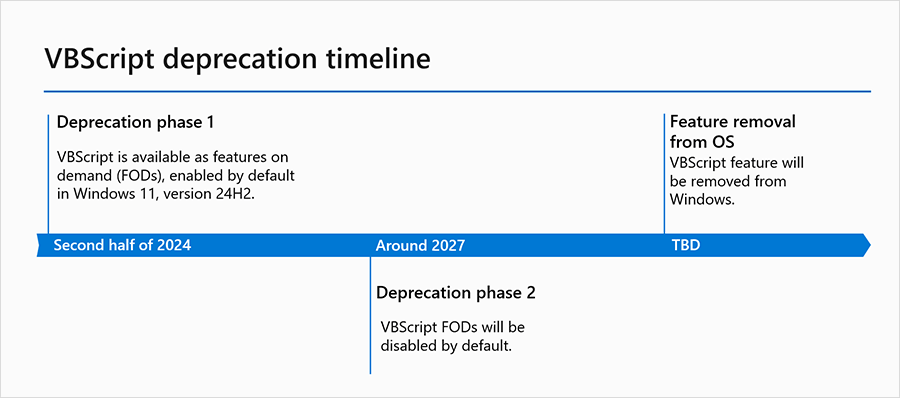
Windows 11 24H2 makes it a removable “feature on demand” (FOD), and sometime in 2027 is expected to be turned off by default in new Windows installs. When it actually gets removed is still TBD, but we’re probably talking somewhere close to 2030 for that. So no need to panic, it’s not going anywhere any time soon.
It is worth mentioning that even though it’s going to hang around in the full Windows OS, there’s no guarantee that is also true for Windows PE — it’s always possible that it could disappear as an optional component there earlier. So don’t get too comfortable with the timeline above.
Overall, VBScript is past its prime and should be replaced with PowerShell wherever possible. PowerShell overall is much more powerful and complete.
The blog post does not explicitly talk about what is actually being removed. From my previous blog, it was surprisingly little: just the VBScript.dll file. All the COM controls (e.g. WScript.Shell, WScript.Network, Scripting.FileSystemObject, Scripting.Dictionary, etc.) are still there, and those were really what made VBScript useful; without those COM controls, VBScript could do very little. Will those go away at some point too? Perhaps, but you should try your best to not care. While these are usable from PowerShell, there’s no good reason to use them from PowerShell as there are better PowerShell equivalents.
Where is VBScript still used today? From my perspective, the biggest usage is still the Microsoft Deployment Toolkit (MDT), which is heavily dependent on VBScript (and another technology that is likely to die, MSHTA, which is based on IE11). Microsoft has stated that MDT doesn’t support Windows 11 or Windows Server 2022, and will never support ARM64. (It still works just fine for Windows 11 and Windows Server 2022, just don’t expect to be able to open any support calls — the community is likely going to keep it running as long as possible with workaround and fixes as required.) Expect more of a shift to PowerShell, and some third-party replacements are likely (hint, hint).
Windows also continues to use VBScript:
- slmgr.vbs, used for Windows Activation.
- winrm.vbs, used for configuring WinRM.
- A set of scripts (located in C:\Windows\System32\Printing_Admin_Scripts) for managing printers.
So those will need to be replaced. There are also SDKs, app installers (e.g. MSIs), and other things that are still using VBScript.dll behind the scenes. That’s why this isn’t going to happen quickly. Those that turn off the VBScript optional feature are likely going to “find” these issues and report them to the app owners, and over time those dependencies will be eliminated (we hope).
For a technology introduced in 1996, it’s had a good run.



 Out of Office Hours
5 responses to “Celebrate the life of VBScript”
How will we hide running CMD or PS scripts without an “invisible” VBS wrapper? 😦
LikeLike
Using -WindowStyle Hidden on the PS command line gets rid of most of it, but you will see the window flash on the screen for a fraction of a second. Otherwise, you would need to use something else, e.g. a custom PowerShell host.
LikeLike
There’s a lot of perfectionists (not myself) who object to the brief screen flash, especially when multiple scripts launch at the same time. If you read btw the lines in the GitHub open issues, PS team wants to point -WindowStyle Hidden’s behavior back to the Terminal team. Terminal team says it’s legacy conhost.exe issue.
If they don’t work it out, everyone will resort to 3rd-party “invisible” wrappers.
LikeLike
Ouch. I see no replacement for
$wshell = New-Object -ComObject Wscript.Shell
….
$BtnCode = $wshell.Popup($sMessage, $nTimeOut, $sTitle, $nType)
LikeLike
Not a very direct one. For very simple cases, I’ve used this:
Add-Type -AssemblyName Microsoft.VisualBasic
$computerName = [Microsoft.VisualBasic.Interaction]::InputBox(‘Specify the new computer name to assign:’, ‘Computer name’, $env:COMPUTERNAME)
LikeLike