

It started off as a simple exercise: I want to grab the latest Insider build containing the features likely to be included in Windows 11 26H2 later this year. Which channel and build would that be? The answer, as illogical as it sounds, is “yes.” In true Hitchhiker’s Guide-style, you might then ask “well then, what’s the question?” The question is really which builds can contain features that will end up in 26H2, and it appears the answer is really “all of them.”
Current releases
Before we get into Insider builds, let’s talk some about the current releases that are out there. (I’ll ignore the LTSC releases as they have their own “every few years” cycle.)
First, we have Windows 11 25H2, which is what everyone should be using or at least working toward. Then, we have Windows 11 26H1, which should only ever be seen on new ARM64-based devices that ship with the (not-yet-in-the-wild) Snapdragon X2 processor family (and potentially any other ARM64 devices that might ship from other chip manufacturers).
Should you install 26H1 on any other machines? No. Should you upgrade anything else to 26H1? No. Will WU ever offer to upgrade older versions to 26H1? No. Could you upgrade manually? Yes, but there’s really no reason to do so. In fact, if you were to do so, you’ll be stuck on 26H1 until 27H2 comes out in 18 months, and you really don’t want that.
Want to read more on that? See https://techcommunity.microsoft.com/blog/windows-itpro-blog/what-to-know-about-windows-11-version-26h1/4491941.
So what the heck is going on? Well, think about how some Windows releases require a full “OS swap” in-place upgrade while others can be upgraded through a simple, easy enablement packages. Those “OS swap” releases represent a platform change, while the enablement packages stay on the same platform but reset the servicing clock while (potentially) adding new functionality.
Let’s look at things a little more visually:

Every time there’s a color change, there’s a platform change. For new releases within a color, those are upgradable using an enablement package.
But wait, Microsoft hasn’t announced whether 26H2 will be an enablement package or not, so why do I say it will be? It’s the only thing that makes sense, given the 26H1 -> 27H2 path. That also shows that the path from 26H2 to 27H2 will not be an enablement package, because there’s a platform change. And that gets everyone back on the same platform.
But what about 26H1 to 27H2? Will that be an enablement package? I’m guessing it will be, but it wouldn’t have to be. And speculating on 28H2 doesn’t do any good.
Now, let’s go back to the statement in the Microsoft blog post that says you won’t be able to upgrade from 26H1 to 26H2. It seems obvious that would be because of the platform going backwards (from orange to blue in the diagram). But more importantly, it would be a downgrade in version numbers. Windows absolutely will not let you “upgrade” to something with a lower version number, so it’s guaranteed that 26H2 will have a number lower than 28000 (the build number for 26H1).
Insider releases
OK, back the original question on Insider releases. Let’s look at what’s available:
| Channel | Current release number(s) |
| Canary | 29553, 28020 |
| Dev | 26300 |
| Beta | 26220 |
| Release Preview | 26100, 26200 |
Alright, so let’s try to decipher that. First, the 29xxx build numbers in Canary are well beyond anything out now. Combined with Microsoft’s statements that things in Canary may never ship, and that there is no way to get out of the Canary channel without reimaging (because all other builds will have lower build numbers), this is for “perpetual testing.” Definitely not what I’m after — I want what is coming later this year.
And what about that 28020 build? That appears to be things that will be coming to 26H1 (28000). Why in Canary? No idea, but again, not what I’m after.
So then we have Dev (26300) and Beta (26200). These appear to represent “things that are targeting 26H2” (Dev), since it’s highly likely that 26H2 would itself be 263xx to follow the historical pattern, and “things that are targeting 25H2” (Beta), which will ship on top of 26200. But the same features could, and often will be, in both, so you could end up getting the Beta enhancement later through WU (using one of many different delivery vehicles, not just cumulative updates) while the same changes end up in 26H2.
Then we’ve got Release Preview, which is really just fixes that are about to be delivered to the released versions, 24H2 (26100) and 25H2 (26200).
OK, so I really want 26300 for things that will end up in 26H2 (some of which will likely be backported to 25H2 as well, but that’s not guaranteed). The latest is 26300.8085 announced on 2026-03-20. OK, so then off to the Windows Insider site to download an ISO, right? Not so fast:
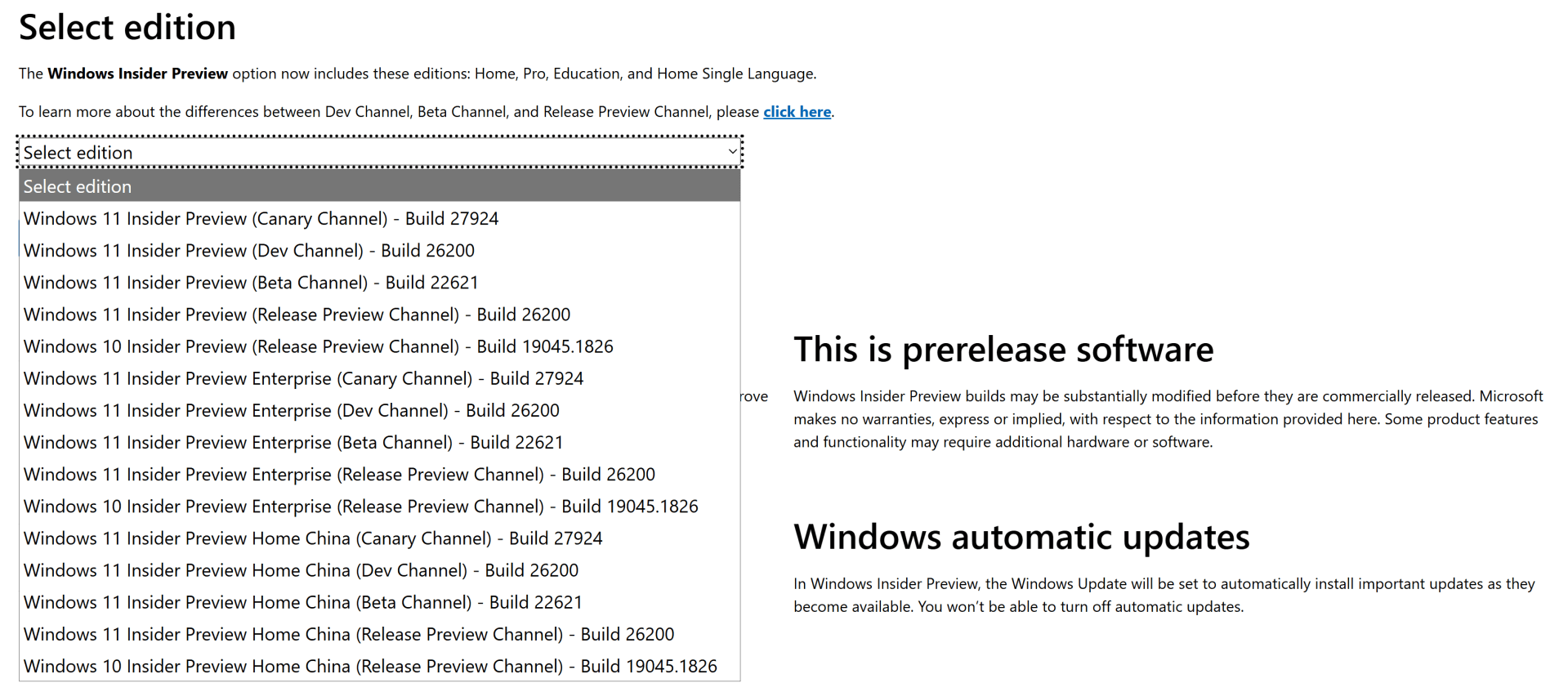
There are really no useful ISOs there. 27924 became 26H1. 26200 is 25H2. So these are all old. Getting to a Dev (or Beta) build therefore requires installing 25H2, enrolling it in Insider Dev, and upgrading it. Sigh…


 Out of Office Hours
4 responses to “Windows releases: secret decoder ring required”
I would best describe it as teh Windows Releases Hokey-Pokey, you put 25H2 in to get 26H2 out,… that’s what it’s all about.
LikeLike
Frankly speaking it is better if companies start evaluating seriously a cloud exit plan and local data cloud centers for sovereignty and security. Things are getting out of control everywhere, AI even in notepad, ads in built-in apps. Had I owned a company, all my servers and workstations will run Linux
LikeLiked by 1 person
Do you know about https://uupdump.net/known.php?q=category:dev ?I believe you can get an ISO built for the version you need using the scripts there.
LikeLike
Yes, but I don’t like to use it — every time I see the nasty batch files that it uses to assemble the pieces I’m (a) amazed they work, and (b) tempted to rewrite them in PowerShell…
LikeLiked by 1 person