
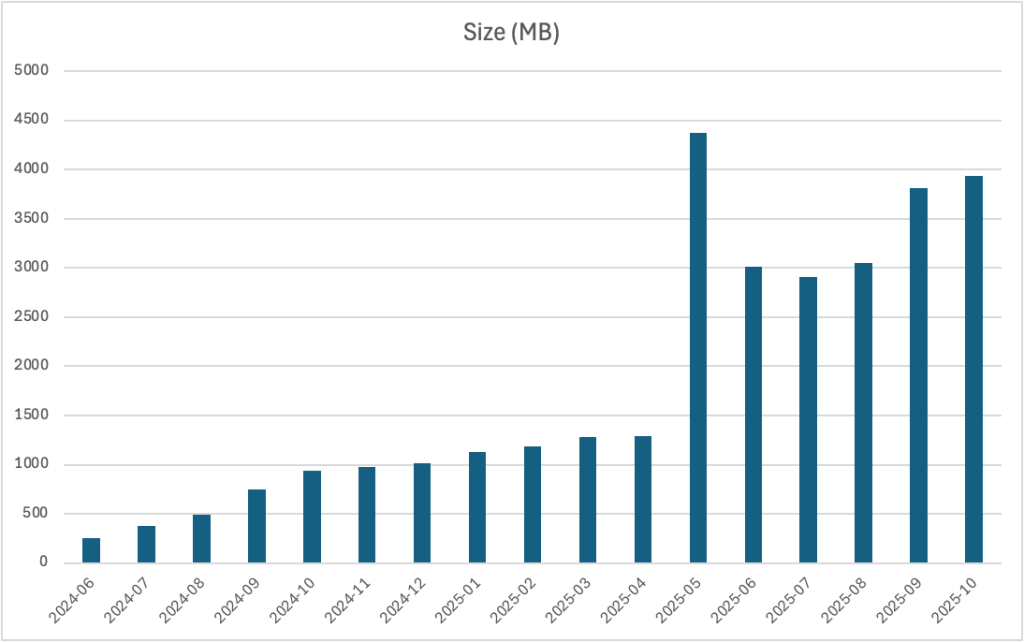
In a session at the MMS Music City event today, it was mentioned that the monthly cumulative update for October for Windows 11 25H2 was nearly 4GB:

The speculation was that this was because of AI, that the models needed were bloating the size. That just really made me scratch my head. Initially, I thought that “Windows 11 25H2 is a new release, the first cumulative update should be small” but then I remembered it was really just 24H2 with an enablement package, so really the size should then have been growing steadily since the 24H2 release until today. That’s easy enough to check by looking at each month’s cumulative update size:

So Windows 11 24H2 cumulative updates grew pretty much as expected from June of 2024 through April of 2025, then something weird happened: the size nearly tripled. But after that, something weirder happened: the size decreased for a few months, and then jumped back up some, but still hasn’t never exceeded that May 2025 oddity.
So how do we figure out what happened with that jump in May 2025? Microsoft does post a CSV file for each cumulative update that is released, so you can download that, open it with Excel, and do some scanning to see what might be out of the ordinary.
Totaling up the size of all 28,000+ files included in that update, as listed in the CSV, shows a total file size of almost 9GB decompressed, so it would be quite reasonable for the compressed cumulative update size to be just under half of that. So far so good. Looking at the previous month’s update (2024-04), the total file size is about 6.5GB. So the decompressed file size grew by about 2.5GB, while the compressed MSU file size grew by about 3GB (from ~1GB to ~4GB). That’s not quite logical — whatever was added, it doesn’t seem to compress well as you would expect the compressed size to grow less than the decompressed size.
Comparing the files lists themselves trying to find significant differences (e.g. a few new large compressed files) doesn’t help either — the same msedge.dll is at the top of the file size list for each of the cumulative updates. There are certainly more files in the 2025-05 update, but none of them appear to be particularly large.
So what’s the logical assumption then? Well, I would say there’s a bug somewhere. And that somewhere is most likely in the list of modified files included in the MSU. So let’s do this the harder way: Download each of the cumulative updates (LCUs) and see what’s inside them. Opening them up in 7zip, it’s pretty easy to see the differences:

So what are all of these .msix files? Well, if we extract them all using 7zip, double-clicking each one will tell us when the desktop app installer tries to install them. Working our way down the list sorted by size, we have app names like:
- PSTokenizer
- Text Recognition Session
- PSOnyxRuntime
- Query Processor Session
- Image Search Session
OK, we’re definitely talking about AI model-related stuff, packaged up as apps that need to be installed. More specifically, it appears to be the pieces needed for Semantic Search, and that leverages the Onyx runtime that Microsoft released for developers. So the reports about this content being related to “AI” (using the over-generalized usage of the term) is accurate.
Alright, why do we care?
The good news is that the Windows Update client is smart enough to only download what is applicable to the machine. So in theory, if those apps aren’t applicable, they shouldn’t be downloaded. But how do we know if they are applicable or not? Will they install on every machine, or just on Copilot+ PCs that have NPUs?
The simplest way to check is to look at the Delivery Optimization statistics available through the Windows Update settings page:

This brand-new Windows 11 25H2 installation (built using the release preview media) on a Hyper-V VM had no updates installed, so it needed to install the latest cumulative update (LCU), along with a few other smaller updates. Total download size is only around 1.7GB. So it obviously didn’t download or install any of the Semantic Search MSIX files. Great, it’s doing the proper byte range logic to only download what it needs (the delta from what the machine was already running, with applicability taken into account).
So then, what’s the downside of this? Let’s look at a few:
- WSUS. Every month, WSUS will download the entire cumulative update, so you need 3-4GB of additional space per month. Make sure you have sufficient disk space, and do routine server cleanup executions to expire and delete superseded updates.
- Configuration Manager. Since ConfigMgr uses WSUS for the SUP functionality, it too will download the full 3-4GB update and distribute it to all your distribution points each month. (Hopefully you aren’t letting these pile up in a deployment package — those are going to get quite large if you do.)
- Offline patching. If you inject an MSU into a full Windows 11 image (or just in time to an OS image that you’ve applied to a disk, i.e. from Windows PE, or with a mounted WIM or VHD), it’s going to have to process the whole MSU. It will at least throw away over half of it when it finds it’s not applicable.
- Third-party patching tools. Unless they are telling the Windows Update agent to install an update directly from WU, the third-party tool is also likely downloading and distributing the whole package to distribution servers. I hope they are smart enough to not download the content to every client before telling WU or WUSA.EXE to install the update — that would be a waste of bandwidth (even without these new .msix files).
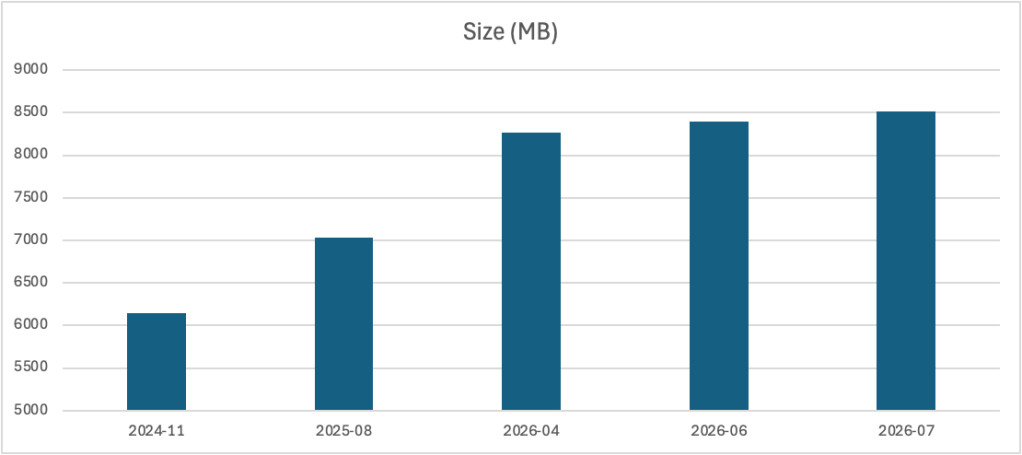
But this is just one Windows feature. What’s going to happen when they add more AI stuff? 8GB monthly updates to a 5GB OS? That’s obviously not a scalable solution.
I hope they’ll find a better way to distribute that content to Windows 11 devices that need it, as stuffing it into LCUs is a bit much. Given all the other ways that are available to update Windows 11, there has to be a better way.




12 responses to “Windows 11 cumulative updates: How can they possibly be that big?”
I find it just as puzzling that MS hasn’t released another Checkpoint CU, one year after KB5043080. If you’re going to bloat the LCU, why not establish a new baseline? Or this dream of smaller delta incrementals was a marketing myth?
LikeLike
They could have make them in separate update or msu, why they stuff them in LCU msu?
LikeLike
I think the problem is MS is trying to hold too tightly to the “One Windows for all” mantra. There isn’t a “Windows for Copilot PC” edition vs. “Windows for non-Copilot PC”. Therefore there can only be one LCU for everyone, which your non-AI PC throws the other half away.
But I agree they should have separate the AI features.
LikeLike
I noticed the size problem today, but reach a different conclusion.
When I tried to download the MSU, the Microsoft Update Catalog gave me a choice between a 509 MB file and a 3 GB one. The 509 MB one was enough. That’s 200 MB smaller than the latest Windows 10 update.
LikeLike
Are you sure you got the actual update and not the previous checkpoint update that it requires? That’s a whole other complication:
https://learn.microsoft.com/en-us/windows/deployment/update/catalog-checkpoint-cumulative-updates
LikeLike
I’m 100% sure that it is exactly what I did and what I intended to do because Microsoft says:
And checkpoint cumulative updates are still cumulative, right?
Right?
(Panicking…)
LikeLike
Well, there hasn’t been a new baseline update since September 2024, so they obviously aren’t doing these very frequently…
LikeLike
Ouch. So, I guess we’re saving neither bandwidth nor disk space. I hate Microsoft.
LikeLike
Interesting. Funny, earlier today I just found some strange directory, I never created/installed myself, that coincidentally coincide with the dates for the May bloat. Here’s the content:
du -nobanner .342f40…81aca1Files: 42Directories: 1Size: 4,047,329,894 bytesSize on disk: 4,047,421,440 bytes
ls .342f40…81aca1
Mode LastWriteTime Length Name—- ————- —— —–a— 2025-05-10 01:52 147971930 14847cc3-88d4-0cbf-cfb7-1ab27f06eb15_1.7.824.0_x64.msix-a— 2025-05-10 01:52 582593 2a0dfa69-2628-f2cd-4a78-f654af5e50c8_1.7.824.0_x64.msix-a— 2025-05-10 01:52 82431369 30de3114-d1a7-aab6-a65f-ef5a746dbead_1.7.516.0_x64.msix-a— 2025-05-10 01:52 38154 3608320c-b0ef-35ca-215e-98625ea09023_1.7.824.0_x64.msix-a— 2025-05-10 01:52 89638018 3b280eb3-0240-ab9f-ffbb-15a3b17483f5_1.7.824.0_x64.msix-a— 2025-05-10 01:52 82196463 4927b7e4-795f-1dda-92d7-143a9ca854c1_1.7.516.0_x64.msix-a— 2025-05-10 01:52 632366 4a312b26-b2bc-9c4f-697e-bd37bd38c298_1.7.824.0_x64.msix-a— 2025-05-10 01:52 807657 4a8123a9-5fd0-fc08-15a0-3889604df3d5_1.7.824.0_x64.msix-a— 2025-05-10 01:52 38109 500aef3f-e14c-4095-8256-cb0ac3f371f1_1.7.824.0_x64.msix-a— 2025-05-10 01:52 334287 51645a2a-725b-fadc-49a9-9db46e4563ec_1.7.804.0_x64.msix-a— 2025-05-10 01:52 425220606 5b3627bf-566c-6719-0cf2-6b1795d93aa9_1.7.824.0_x64.msix-a— 2025-05-10 01:52 291466437 5f315327-02fe-671b-f553-179b3508ae0b_1.7.824.0_x64.msix-a— 2025-05-10 01:52 808585656 61e42671-4c6d-a52a-2c7d-f786f5b2bc9c_1.7.824.0_x64.msix-a— 2025-05-10 01:52 808585628 6645a2ea-5804-a115-f379-7e4b27132a00_1.7.824.0_x64.msix-a— 2025-05-10 01:52 38143 6f5ba4de-b4b6-9253-aa28-c1a99434c514_1.7.824.0_x64.msix-a— 2025-05-10 01:52 5994140 7b0d9694-6b7d-9587-48b3-59b76c09c7b4_1.7.824.0_x64.msix-a— 2025-05-10 01:52 29236309 7f26acc0-d169-1844-1b15-f330069e4df7_1.7.824.0_x64.msix-a— 2025-05-10 01:52 1042046 81054e32-601c-a517-c313-c9dea0eb6d6d_1.7.824.0_x64.msix-a— 2025-05-10 01:52 1041941 87e37cc0-3e5e-ff32-fd8e-c47978064684_1.7.824.0_x64.msix-a— 2025-05-10 01:52 80695229 8bc0a1ab-339d-f7ac-373e-8d4007d1a53c_1.7.824.0_x64.msix-a— 2025-05-10 01:52 632481 91c85e29-7596-a250-23da-d10c968374e4_1.7.824.0_x64.msix-a— 2025-05-10 01:52 82196363 9959e792-3fa2-a9b6-db4b-607e9c36dec2_1.7.516.0_x64.msix-a— 2025-05-10 01:52 759778 99c8c976-ccf8-753b-683d-07c62b9e7e6c_1.7.824.0_x64.msix-a— 2025-05-10 01:52 4778020 a21d731f-299f-19d9-6ea2-53d0ed10823c_1.7.824.0_x64.msix-a— 2025-05-10 01:52 38151 a7d5832f-17ea-735d-fc9c-3558b64b909c_1.7.824.0_x64.msix-a— 2025-05-10 01:52 14179673 b6551a0a-0f16-038c-8714-a8bf42b939fa_1.7.824.0_x64.msix-a— 2025-05-10 01:52 582721 bc8dfc28-22bf-7bba-001d-1bd953401d71_1.7.824.0_x64.msix-a— 2025-05-10 01:52 38128 c15eb352-5ea9-1f86-c2cf-c672f144f202_1.7.824.0_x64.msix-a— 2025-05-10 01:52 82431499 c6a3c941-80b2-c959-d4bc-c79499d29816_1.7.516.0_x64.msix-a— 2025-05-10 01:52 807378 cbafa2f6-4e6d-ea39-3e34-6b8c0964d650_1.7.824.0_x64.msix-a— 2025-05-10 01:52 759626 d8933cd4-e2bf-d7b8-caa9-0929c94e2de8_1.7.824.0_x64.msix-a— 2025-05-10 01:52 6662109 DesktopDeployment_X86.cab-a— 2025-05-10 01:52 7872807 DesktopDeployment.cab-a— 2025-05-10 01:52 1376611 e28da4dd-c4ea-371a-b8fa-3ac749d1bedd_1.7.824.0_x64.msix-a— 2025-05-10 01:52 38151 ef4ea2cb-0a7f-e531-1d14-4a70b505f6a5_1.7.824.0_x64.msix-a— 2025-05-10 01:52 81201566 ff21267a-ccf0-b2e1-57e5-3acd786f0b8d_1.7.824.0_x64.msix-a— 2025-05-10 01:52 43335446 ff43562a-1c67-b38a-6aad-93f7cd5881b2_1.7.824.0_x64.msix-a— 2025-05-10 01:52 49526 onepackage.AggregatedMetadata.cab-a— 2025-05-10 01:52 19780227 SSU-26100.4060-x64.cab-a— 2025-05-10 01:52 711984295 Windows11.0-KB5058411-x64.psf-a— 2025-05-10 01:52 130951903 Windows11.0-KB5058411-x64.wim-a— 2025-05-10 01:52 296354 wsusscan.cab
LikeLike
Not that unusual for cumulative updates, especially when there are third-party antivirus software products involved.
LikeLike
Looks like you should enable code blocks on these WP comments.
LikeLike
Just stumbled on this. Thanks for digging into it. Currently looking for ways to more efficiently managed W11 updates in some locations that are on data plans with often slow access. No servers available. Was thinking of downloading annual ISO’s with monthly, or even quarterly CUs, to a single device, then installing across the local network. Really don’t want to have to download more than is needed. Could try to send out USB sticks periodically but don’t want to.
Might be better to allow devices to do their own individual downloads with metered connection restrictions on to further reduce size. Will be curious to see multiple individual downloads works out to be less data than a single full download made available locally…
LikeLike