
I was working on some changes to the Autopilot Branding package and testing them out on Windows 11 24H2 and noticed a problem: One of the registry values I was trying to adjust, to hide the Widget button from the task bar, wasn’t working; it would get an access denied error. Since this is running as LocalSystem, and another registry value in the same key *can* be changed, there was obviously some trickery going on.

Some internet searching pointed me to this blog, which talks about what is going on: https://kolbi.cz/blog/2024/04/03/userchoice-protection-driver-ucpd-sys/
So, UCPD is a new driver that’s sole purpose is to prevent changes to certain user preferences. It has a list of registry paths that it blocks. You can see those fairly easily using the Sysinternals strings.exe utility against the C:\Windows\System32\drivers\ucpd.sys file:
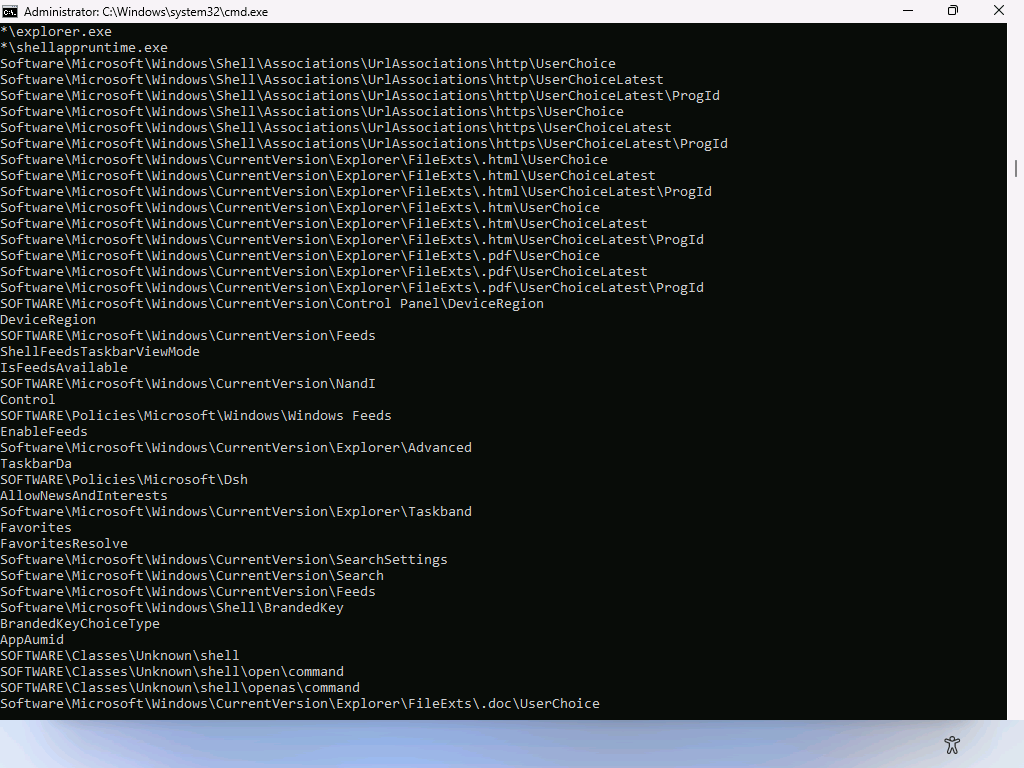
It only allows Microsoft-signed binaries to make changes, and specifically blocks certain binaries that you could use yourself to do that:

To work around that in the Autopilot Branding script, I initially added logic that just disabled widgets altogether (rather than just hiding the icon), but then https://github.com/HedgeComp provided a different workaround that is quite hilarious:

What does that do? It makes a copy of the (blocked) reg.exe with a different name, then runs that. Will Microsoft close that hole at some point? Possibly, as they seem to update this driver (which can’t be unloaded, but isn’t present in Windows PE, so you can always make offline changes) fairly frequently. Let the whack-a-mole battles commence.


 Out of Office Hours
3 responses to “What is Windows 11’s new UCPD “feature”?”
Had to deal with this a week ago. It would remove the reg key for blocking widgets. Luckily I found another reg key that blocks news and interests (AllowNewsAndInterests) as a work around
LikeLike
While you can bypass the restrictions by copying reg/regedit/powershell to a non-blocked filename, the best answer is to entirely disable UCPD in the specialize pass.
LikeLike
Good to know that’s an option, because Microsoft is likely going to keep tightening the screws.
The general idea of keeping random software from making changes is fine, but the fact that it can keep IT people from configuring the devices in bulk (because there are no “preference”-style policies to do so) is annoying. So if you would disable it, I would probably choose to re-enable it later.
LikeLike