

The title says it all — well, not quite because the full description is more involved and nuanced. This post on LinkedIn from Sameer Agarwal, an Intune engineer at Microsoft, explains more:
(The main reason I noticed: the Autopilot graphic that goes back to 2017/2018 — it will live forever.)
The bullet points:
- The device contains a TPM (Trusted Platform Module), either TPM 1.2 or TPM 2.0.
- UEFI Secure Boot is enabled. See Secure Boot for more information.
- Platform Secure Boot is enabled
- Platform is Modern Standby or HSTI compliant (this requirement has been removed since Windows 11 24H2)
- There are no un-allowed Direct memory access (DMA) interfaces (this requirement has been removed since Windows 11 24H2)
That points out a significant change in Windows 11 24H2: the modern standby and DMA requirements, which severely restricted this, have been removed. I think that’s good news overall.
The documentation link mentions more as well:

I really don’t know what the difference between “Platform Secure Boot” and “UEFI Secure Boot” is, but I guessed that a Hyper-V VM would meet the requirements, so I checked on that I had just provisioned using Autopilot v2, and sure enough, the volume was encrypted even though I had no policies configured to do so:
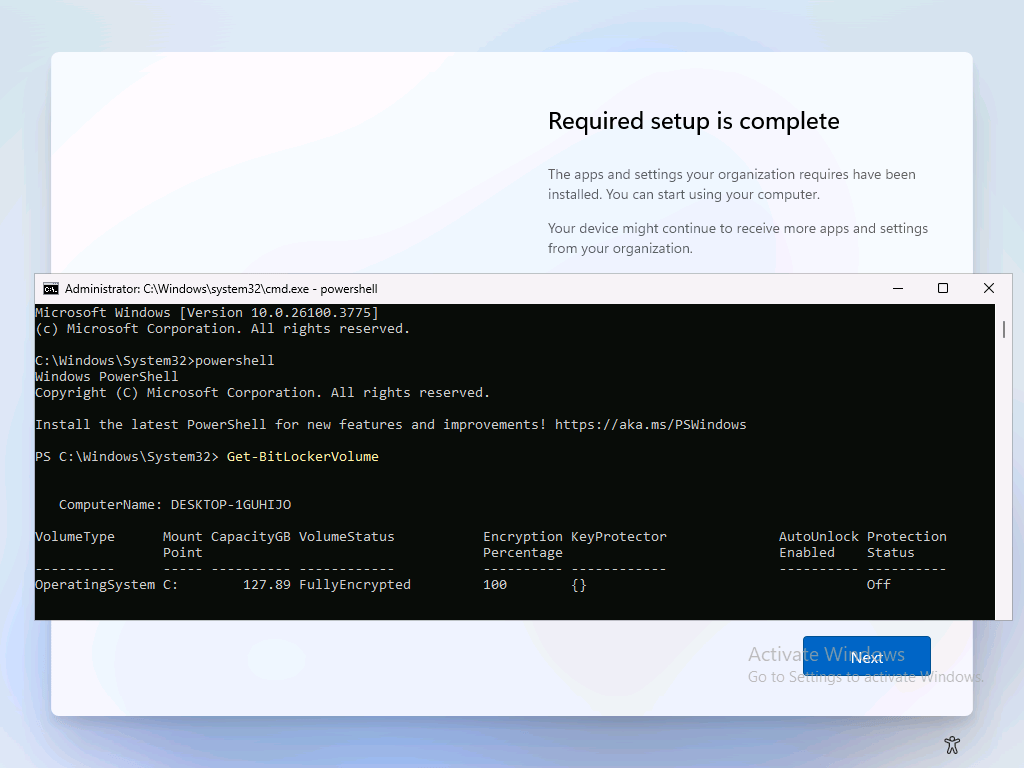
As you can see here, the drive is fully encrypted but there are no protectors yet. If I click “Next” here to continue the process and sign into Windows 11 on this Entra ID-joined device, then the protectors get added (since they can then be backed up to Entra):

The same was true on Autopilot v1, fully encrypted and protected after the Autopilot process completed:
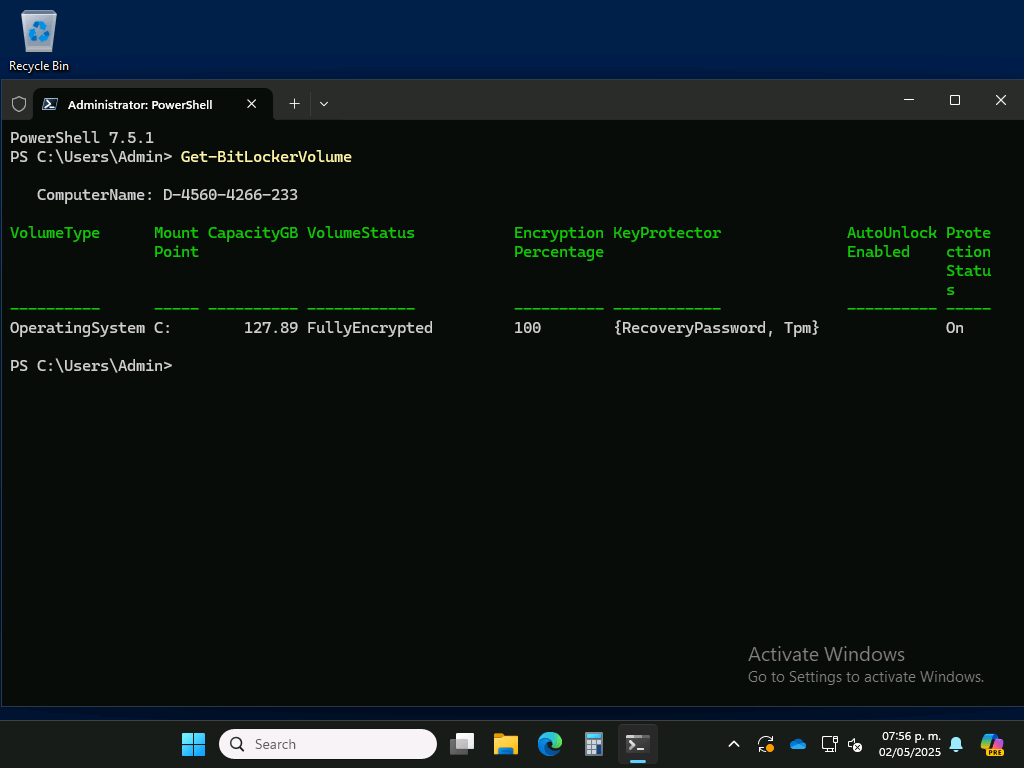
Overall, that’s a welcomed change, just not sure why it took years to implement it.






4 responses to “BitLocker auto-encrypts more systems with Windows 11 24H2”
Automatic device hard drive encryption was implemented quite a long time ago, assuming the device meets the necessary requirements. The only issue arises if your company enforces a stronger encryption algorithm — in that case, the automatic encryption can become a problem, as you’ll need to fully decrypt the drive and then apply a new policy with the stronger algorithm.
LikeLike
Yes. The point of the post is that it now applies to most systems, not just a small subset, due to the changes in 24H2.
LikeLike
APv1 makes it pretty easy to get a BitLocker policy to the device before it starts encrypting. Apparently that can’t be said for APv2 — you need to adjust the setting manually before enrolling the device.
LikeLike
Hey there. I have a question. We wish to use 256bit / Full encryption in our org. I’ve been struggling to get this stuff to work.
Would it be enough to stop the encryption during initial installation of the machine, and that would trigger the Intune policy?
LikeLike