

I spent a lot of time in the weeds around Windows licensing, but I’d prefer to forget it all. Sadly, that’s usually not an option, especially as I work on Windows imaging technologies. Since it’s been a while since I looked at that stuff, I figured I would start from the beginning to see if anything has changed in the last few years.
First, some background information is useful. Windows can be licensed under three different types of licenses:
OEM. Windows 11 Home and Pro (and a few others) are licensed by Microsoft to OEMs for them to preinstall on new devices. These can be large OEMs (e.g. Dell, Lenovo, HP, etc.) or small system builders.
The latest Windows 11 OEM license terms can be found here. For the most part, the terms aren’t particularly interesting, but there are a few items worth noting: You can make a backup copy of the software. You can’t transfer the license to another device. Contact the OEM for support, not Microsoft. You can choose between 32-bit and 64-bit where appropriate (not really anywhere anymore, since Windows 11 is 64-bit only). Downgrade is supported for Windows Pro, but no one (Microsoft or the OEM) is obligated to provide you with media. There is a 20-device connection limit for “file services, print services, Internet information services, and Internet connection sharing and telephony services” but unlimited for “synchroniz[ing] data between devices.”
The weirdest restriction: If you remotely access the device, that can only be done by one user; that user can be changed every 90 days; and that user must physically access the device at least once a year.
The part that I would say is probably impossible to enforce: “you may not…work around any technical restrictions or limitations in the software.” I would argue that any software that installs a kernel driver is doing so to work around “technical limitations in the software.” And that’s just one class of software that works around “technical limitations.” But overall, that’s a topic for another day.
Retail. You can buy a “boxed” copy of Windows 11 Home or Pro to install on a physical or virtual device. Typically you would do this for a “bare” device that didn’t come with Windows preinstalled (e.g. a computer your built yourself), or a virtual machine (e.g. Parallels on a Mac).
Weirdly, the online license terms site doesn’t have a Windows 11 retail terms document. The latest it has is a document from Windows 10, last updated in 2018. That said, there are not likely any significant differences between the Windows 10 and Windows 11 documents. And surprisingly, there are very few differences between the OEM and retail licenses too. In fact, as I go through the documents, I only see one significant difference: a retail license can be transferred to a different device (using the backup copy that you’re allowed to create).
Volume Licensing. You can purchase licenses Windows 11 Pro, Enterprise, Education (etc.) licenses through various Microsoft licensing programs. Sometimes these will be “upgrade only” licenses (you need to have a qualifying OS in order to use the volume license). I talked about that more in my previous licensing post.
As to exactly what terms apply, well, that gets complicated as this chart from the volume licensing site shows:
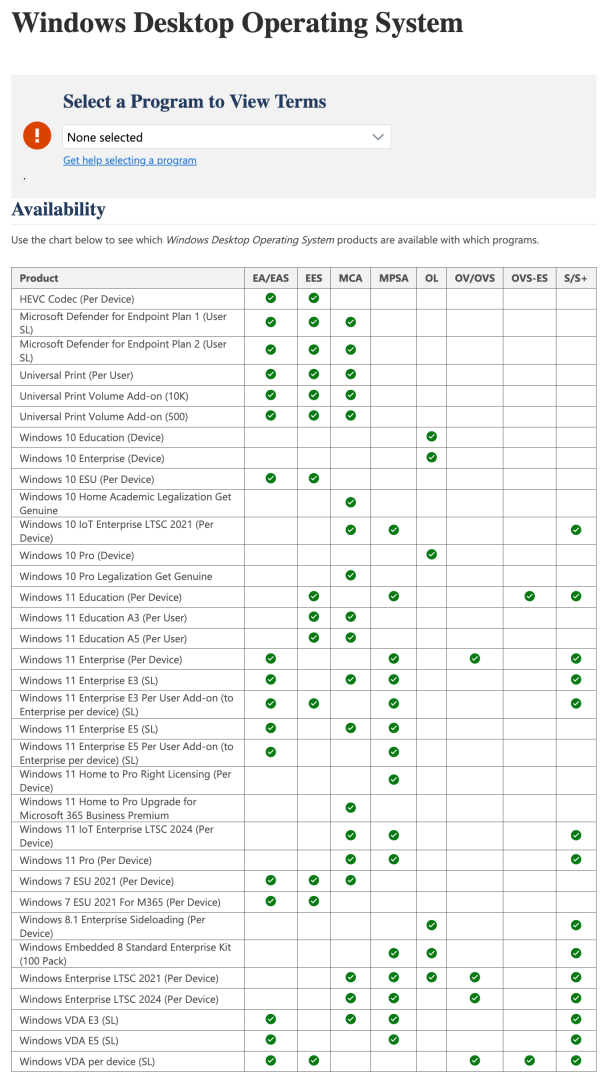
Each of the columns corresponds to a particular licensing program; each row is a different Windows subscription license. Fortunately, from a terms perspective they don’t vary much, so I chose to look at the “Windows 11 Enterprise E3 (SL)” product from the Microsoft Customer Agreement (MCA) program (the program that Microsoft is slowly migrating customers to as enterprise agreements fade away). Eventually as you click through the links, you get to one for the “Windows 11 Licensing Guide” which has lots of details. For example, each user can activate up to five devices or virtual machines (as long as you have a qualifying OS on all of those devices); you can install an LTSC release if you choose, but if licensed per user (typical for E3) that license is not perpetual; you can downgrade to any older version, not just the previous one (but pretty soon there won’t be any supported versions to downgrade to anyway); you get VDA rights when using your own VDI infrastructure; you get MDOP (if that matters any more); you can upgrade to later versions for free (if there are any later versions); you get the rights to use various features that aren’t available without E3/E5 (e.g. Autopatch, Connected Cache); you get longer support.
Alright, what did that prove when it comes to imaging? Absolutely nothing, except to say that the license terms for the various types of licenses and licensing programs don’t discuss this stuff at all, even in obvious cases where you would typically reimage a device, e.g. installing an LTSC release. So where is that covered? Well, there’s another page that has “licensing briefs” and one of those briefs, called simply “Reimaging Rights,” has all the details. Here’s the introduction:

Going back to the previous discussion around licensing types, you can see the default reimaging rights for each:

Alright, so you need to meet the requirements listed in order to reimage any OEM or Retail device. That means that you need both (a) the rights to do so, and (b) the volume license (commercial licensing) OSmedia to do so, and (c) a way to activate the volume license OS. So let’s go through those one at a time:
The rights to do so. As the summary mentioned, that means you need an Enterprise Agreement, MPSA, Open License, Open Value, or CASA agreement. Not included on that list is an MCA, which eventually will replace the Enterprise Agreement. Need a refresher on those agreements? This doc does a decent job. If you are using an Open agreement, not only do you need the agreement, but you need to buy at least one copy of Windows:

The volume license OS media to do so. If you have upgrade rights through any subscription (e.g. Windows 11 E3, Microsoft 365 E3), you’ll have access to the Windows media through https://admin.microsoft.com (the replacement for VLSC). If not, the purchase (e.g. through Open Value) should give you access.
A way to activate the volume license OS. This is pretty much the same as above. Here’s the text from the FAQ (keeping in mind that VLSC was replaced as mentioned above):

There are some head-scratching sections in that product brief too, for example from a section talking about eligibility is only for “identical products,” even down to the language:

It feels like this text hasn’t kept up with Windows licensing overall, since the most recent releases don’t put restrictions on languages (at least for Pro and above).
What other head-scratching issues are there? Well, what about the Media Creation Tool? Based on Microsoft’s own terms, it seems that you would need reimaging rights in order to use the Media Creation Tool at all, at least to do a clean install of the OS on a device. (Using that media to do an upgrade would be a different story.) The “official” allowed way would be to contact the OEM to get recovery media for the version of Windows that the device shipped with. But that’s another separate diversion as that can be a fun process to go through.
So what’s changed in the last few years? Not much, except for some programs going away (Select agreements are gone, Enterprise agreements are slowly heading that direction). But at least the capabilities are still there.
Simple stuff, right? If you have any questions, contact Microsoft, your reseller, or other licensing experts.



 Out of Office Hours
4 responses to “Love/hate: Windows imaging and licensing”
As always – great to read. As for the licensing? Clear as mud. 🙂 🤣🤣
LikeLike
Is the “Reimaging rights” document enforceable? After all, if it’s not mentioned in the license agreement, the licensee has never agreed to it.
LikeLike
A good question for lawyers — that’s why I was originally looking at the license terms figuring they would definitely say “you can’t” while the subsequent note would say “unless you have this other right”. But the originals don’t get specific enough — you really have to read between the lines to turn the “backup copy” text into “no imaging”, especially when you are going to be using media that Microsoft provides.
It’s also interesting that there is a sentence that effectively says “you as the customer need to provide proof to third parties before they can image a device on your behalf.” OK, what provides that third party the rights to do this? Or are these third parties only the OEMs and system builders?
LikeLike
When I become the king of the world (😉), I’ll decree that laws that only lawyers understand are null and void. After all, everyone is supposed to obey the law, not just lawyers.
When I was reading everything you wrote, I was thinking, how about Title 17 of United States Code, section 117 (“Limitations on exclusive rights: Computer programs”), article C (USC17 § 117c)? Does that come into play? Because USC17 § 117c grants reimaging rights.
LikeLike