
Microsoft enabled automatic updates for PowerShell with the release of PowerShell 7.2; that continues now with PowerShell 7.4. If you’re devices are updated from Windows Update directly and you’ve enabled updates when you installed PowerShell 7, you’re all set. But if you are using WSUS or SCCM, there’s another step that is necessary: you have to enable the PowerShell product.
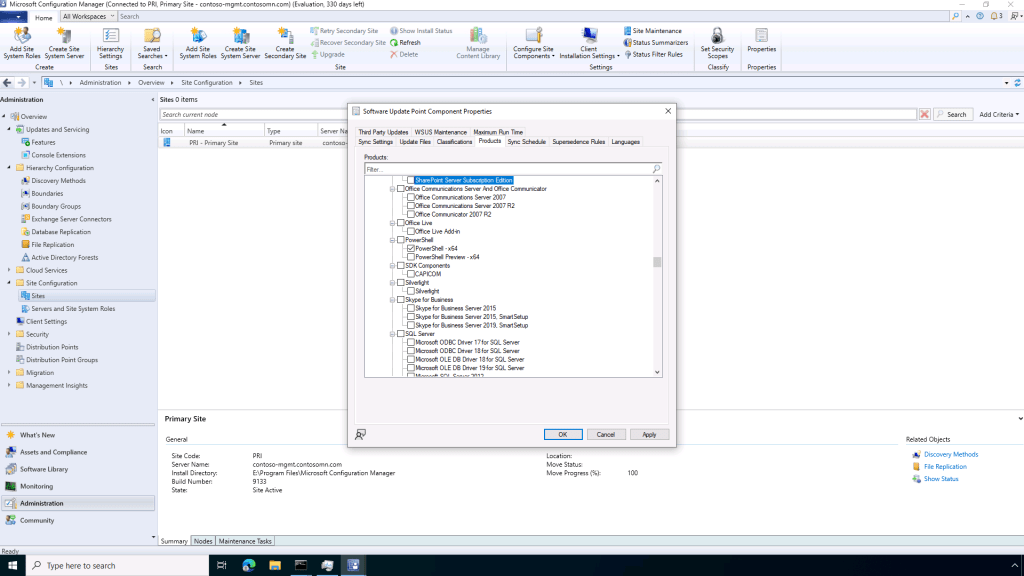
In the SCCM case, you need to enable PowerShell in the Software Update Point Component Properties dialog, on the Products tab. You get to this page from the Administration -> Site Configuration -> Sites node by selecting the primary site in question and then choosing “Software Update Point” from the “Configure Site Components” menu.

Check the box for “PowerShell – x64” and save the changes; the next sync will grab the appropriate PowerShell update information. If you are installing PowerShell preview releases, you could enable updates for those too; otherwise, you’ll just get updates based on the version(s) that you have installed (more on that below).
Depending on your Automatic Deployment Rules in SCCM, you might need to either modify an existing rule or create a new one to deploy these PowerShell updates. I just created a simple one that includes any non-superseded updates:

In the case of WSUS, the necessary configuration is under Options -> Products and Classifications.

The next question you should ask: What version of PowerShell is going to be installed? Well, first you need to have a version of PowerShell 7 installed; it won’t be installed automatically. But once there is one there, what updates it will receive depends on whether you’ve installed a long-term servicing (LTS) version or not, and what the current support lifecycle is for the LTS version. Right now, the rules are “simple”:
- If you’ve installed any LTS version of PowerShell 7 (the even-numbered point releases, e.g. 7.0, 7.2, 7.4), you’ll get the latest 7.4 version (7.4.6 at the moment).
- If you’ve installed any non-LTS version of PowerShell 7 (the odd-numbered point releases, e.g. 7.3, 7.5), I believe you’ll get the latest supported non-LTS release. At the moment, there are no non-preview, non-LTS releases, so you’ll be upgraded to the latest LTS release (again 7.4.6).
So what happens when PowerShell 7.5 is released (expected in Q4 2025)? For any machine running 7.4, nothing will happen. LTS releases are not updated to later non-LTS releases, and 7.5 is not an LTS release. But if you install a 7.5 release, you would then get updates to later 7.5 releases.
What happens when PowerShell 7.6 is released (expected in Q4 2026)? Then all 7.4 installs will eventually be upgraded to 7.6 — after 7.4 reaches its end of servicing (one year after the 7.6 release, so Q4 2027).
It might sound confusing, but overall it makes sense: be cautions with LTS releases, keep marching forward with new point releases.


 Out of Office Hours