

After years of neglect, no one was terribly surprised when Microsoft said that MDT would not support Windows 11. Even prior to that, it was often up to the community to keep things working as new Windows and ADK releases came out. So it was also not surprising that the community also kept using MDT with Windows 11 — it works just fine, with some minor tweaks to handle changes in the latest ADK releases. (See my previous post on that.)
But at the end of the day, it is the end of the line for MDT because the technologies that it is using are going away:
- VBScript is deprecated and will be removed at some point. It’s an optional feature in Windows 11 24H2, installed by default; in 2027, it will no longer be installed by default; at some point after that, it will be removed. See https://techcommunity.microsoft.com/blog/windows-itpro-blog/vbscript-deprecation-timelines-and-next-steps/4148301 for details.
- The MDT wizards using MSHTA (hyper text application), which is based on Internet Explorer 11. Yes, the IE11 components to support that are still included in Windows 11 and the latest ADK, but at some point those will be removed and those wizards will no longer work.
- The MDT “Deployment Workbench” is an MMC snap-in that uses the .NET Framework. That whole setup was always flaky and some day it could just stop working altogether (MMC is another technology that Microsoft has been ignoring for a long time).
It should come as no surprise then that Microsoft has announced an end date for MDT, but in typical Microsoft style they have done so in an odd place and with ambiguity. Here’s the note that was added to the Removed and Deprecated Features page for Configuration Manager:

OK, the way it is written makes it sound like this is “effective immediately” but really this is just the advanced warning: the first release of Configuration Manager after October 10th, 2025, will no longer support the MDT integrations. OK, straightforward enough.
But what about that initial phrase “MDT Integration with CM and Standalone”? That’s not clear at all. “MDT Integration with CM” is what the rest of the text is talking about. So what’s this “and Standalone” piece? We can only guess what Microsoft intended there, but I am assuming that this refers to “the rest of MDT,” the Lite Touch scenarios that don’t integrate with ConfigMgr. So effectively, “MDT Integration with CM and Standalone” is the same as saying “MDT as a whole.”
Now maybe Microsoft will clarify this at some point, but the safest assumption is that MDT as a whole will no longer be supported after October 10, 2025. Will it continue to work? Probably for a while, at least until the ADK removes something (HTA, VBScript) that breaks it. Will it continue to be available to download? Probably for a while (heck, there are still supported Windows 10 LTSC releases that could use it), but I’m sure people will stash away copies just in case.
So what now?
I’ve given presentations at a few events this past year layout out the scenarios that still require a bare metal imaging solution:
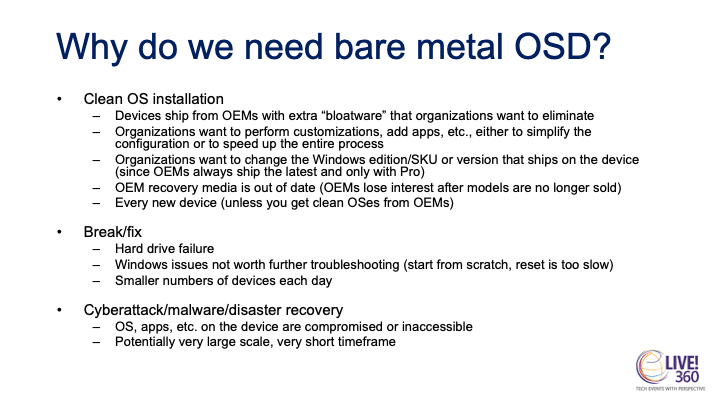
Perhaps you can get by with something as simple as a USB key for low-volume cases like break/fix, but for larger quantities you need better solutions. Imagine the worst-case scenario where all of your devices need to be reimaged quickly (e.g. due to a malware infestation, or even a Crowdstrike-like incident where there is no simple fix that can be applied). How would you do that?
Sure, SCCM is still around and continues to work great for bare metal OS deployment, but if you move to “cloud native” will you keep SCCM just for bare metal OS deployment? And in those malware recovery scenarios, will you be able to get SCCM back up and running fast enough to be able to recover your devices? It’s always good to have a contingency plan — previously, that was MDT, but if MDT is no longer able to fulfill that role, you then need a different “plan B.”
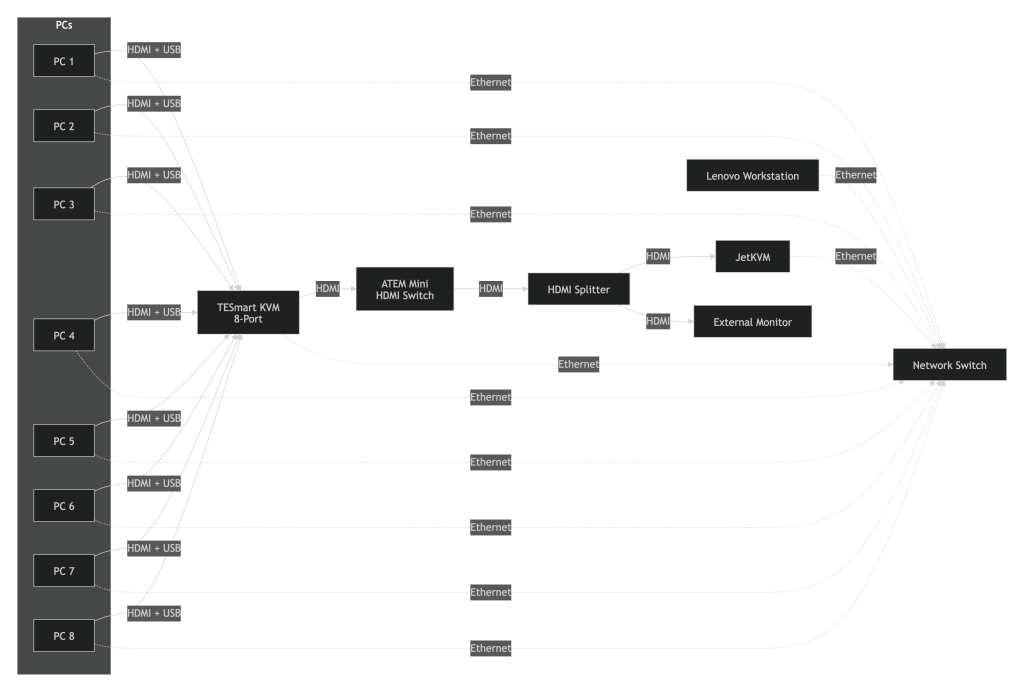
At 2Pint, we are working on a new solution called DeployR that can function as a replacement to MDT, as well as a “plan B” for disaster recovery or other fallback scenarios. We’ll have more to share on that in the coming weeks and months, but here’s a sneak peek:





15 responses to “MDT has an end date”
If it will replace MDT will you offer it for free?
LikeLike
We will have a free offering, yes, still working out the exact details.
LikeLiked by 1 person
Happy to alpha/beta test in an educational space.
G
LikeLiked by 1 person
Hello, great news. If you need a beta tester, let me know.
Thanx for all your work.
Bernhard
LikeLike
Hello this is great, if you need a tester, just let me know.
LikeLike
So I wonder then what will happen to FriendsOfMDT?
Seems a shame that it will no longer work when lots of time was spent on it.
LikeLike
We hope to run PSD on top of the DeployR solution that we are working on — same basic scripts/setup, but new framework/engine.
LikeLike
Hello Michael,
I am currently moving to PSD and I will be more than happy to help you in any test.
LikeLike
So with MDT integration gone will SCCM still do OSD? I’ve only used MDT standalone (18 years now!) so will need a solution. Just found out we will also need to support OSD for Windows on ARM, fun times ahead!
LikeLike
Yes, SCCM will still do OSD. The debate will be whether it’s worth keeping SCCM around once you move to “cloud native” if all you are using it for is OSD…
LikeLike
like others said, happy to beta test! Kinda the same as we did back in our Microsoft days 😉
LikeLike
What parts of MDT integration are done without using standard SCCM custom action MOFs? I’m maybe not saying it right – but aren’t all the custom MDT actions in SCCM TS created and imported using methods MS made available so that 3rd party groups could extend SCCM task sequences?
Wouldn’t they need to break the ability to import 3rd party modules to stop MDT integrations? But that is not what the announcement says. This announcement is specifically about MDT. There are other 3rd party partners that have extended TS steps with MOFs arent there? I was able to find a few.
LikeLike
Yes, MDT uses the standard SDK that ConfigMgr provided for this. Who knows exactly what they are trying to say, other than “we’re washing our hands of it.”
LikeLike
I just don’t understand the Microsoft mindset around imaging. They keep saying “use Autopilot, it’s so easy to set up Windows!” but they are abandoning all of the ways to get Windows onto the computer in the first place. We can see the writing on the wall – SCCM is eventually going to go away too. And if it does, there would be no Microsoft application available to easily format the drive, install Windows, and install drivers from bare metal. Are they thinking that we are all going to send the computers back to the OEM to get them reimaged if needed? My company can’t afford to do that (both money and time wasted).
LikeLike
Great articall. Great news! looking forward to it. Although we are using autopilot I agree that we still need a way to get a clean install.
LikeLike