
After a long time working exclusively on Windows devices, I had switched to MacOS on a MacBook Pro a few years ago because that was the practical thing to do while working on cross-platform development based around open-source technologies. The biggest downside: it was an Intel-based Mac, and the battery life when running Edge (for personal stuff), Chrome (for work stuff), Visual Studio Code, and Teams was “sub-optimal” — fortunately I used it plugged in most of the time, and when I needed to be more mobile I switched to a Samsung ARM64-based laptop.
Fast forward to a year ago: I started working at 2Pint Software and wanted to continue on a MacOS, this time switching over to an M3-based MacBook Pro with outstanding battery life and great performance. But for development tasks, I would be working primarily on Windows. So how would this new device work for that?
I had initially tried using Visual Studio Code and the C# Dev Kit on MacOS. That exercise lasted for less than a day before I gave up. That solution at the time wasn’t up to the task, and I haven’t looked at it again since to see if it has improved. Fortunately, I had a “plan B”: Using a Windows 11 ARM64 virtual machine. I’ve used both Parallels and VMWare Fusion on MacOS in the past, and like using both, but for different purposes:
- Parallels Desktop for Mac works well for productivity tasks: it feels very refined, and works smoothly to integrate with MacOS.
- VMWare Fusion works well for its complete emulation capabilities, useful when testing bare metal OS deployment scenarios. But on ARM64 especially, it still feels raw, like it’s a beta product. It has its place, but not as a daily productivity environment, at least not for me.
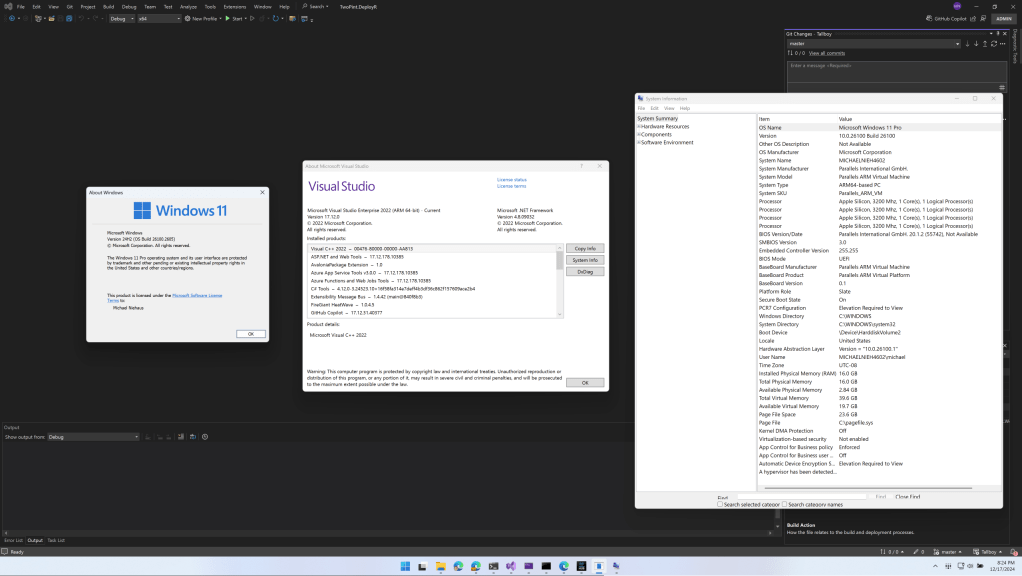
So, I have Windows 11 Pro ARM64 (now running 24H2) running in a VM on my MacBook Pro laptop. The laptop is running an M3 Max processor (necessary to support three external displays at the time, a restriction that I believe Apple has relaxed since then) with 14 cores (10 performance, 4 efficiency), 36GB of RAM, and 1TB of NVMe storage. I used Office, Teams, and Edge in MacOS, and primarily Visual Studio in the Windows 11 VM. Even with all of this running on the device, it can still typically manage over 8 hours on a charge, so if I take the laptop with me (e.g. on a flight, to an event or user’s group meeting, etc.) I don’t typically carry the power supply with me — I know I’ll be back where I can charge later.

But how well does Windows 11 work on ARM64, especially when developing software that most likely won’t be running on ARM64? Overall, it works really well: Visual Studio running on ARM64 is flawless, .NET is naturally architecture-neutral, and cross-compiling for x64, MacOS, and Linux is easy. Running Windows x64 binaries is easy because the x64 emulation is very good. I usually use one of my three external displays, a 32″ 4K monitor, exclusively for Windows, with the other two external displays used with MacOS (one for browsing, one for Teams), and the 14″ laptop display (16″ feels too bulky) used for other miscellaneous activities.
Has everything been smooth? Not quite. Initially one of the Visual Studio Code extensions displayed an “architecture not supported” popup about once a day — I never tracked down which extension did that, but the issue did eventually go away on its own. There was one bigger issue though: SQL Server 2022 doesn’t support ARM64. That’s a really weird omission from Microsoft that one of these days they’ll actually fix (I hope). Fortunately, you can use some third-party scripts to install it, working around issues in the SQL Server installer that would otherwise get in the way. Once that’s done, it works just fine in emulation (with a few feature limitations that don’t matter to me):

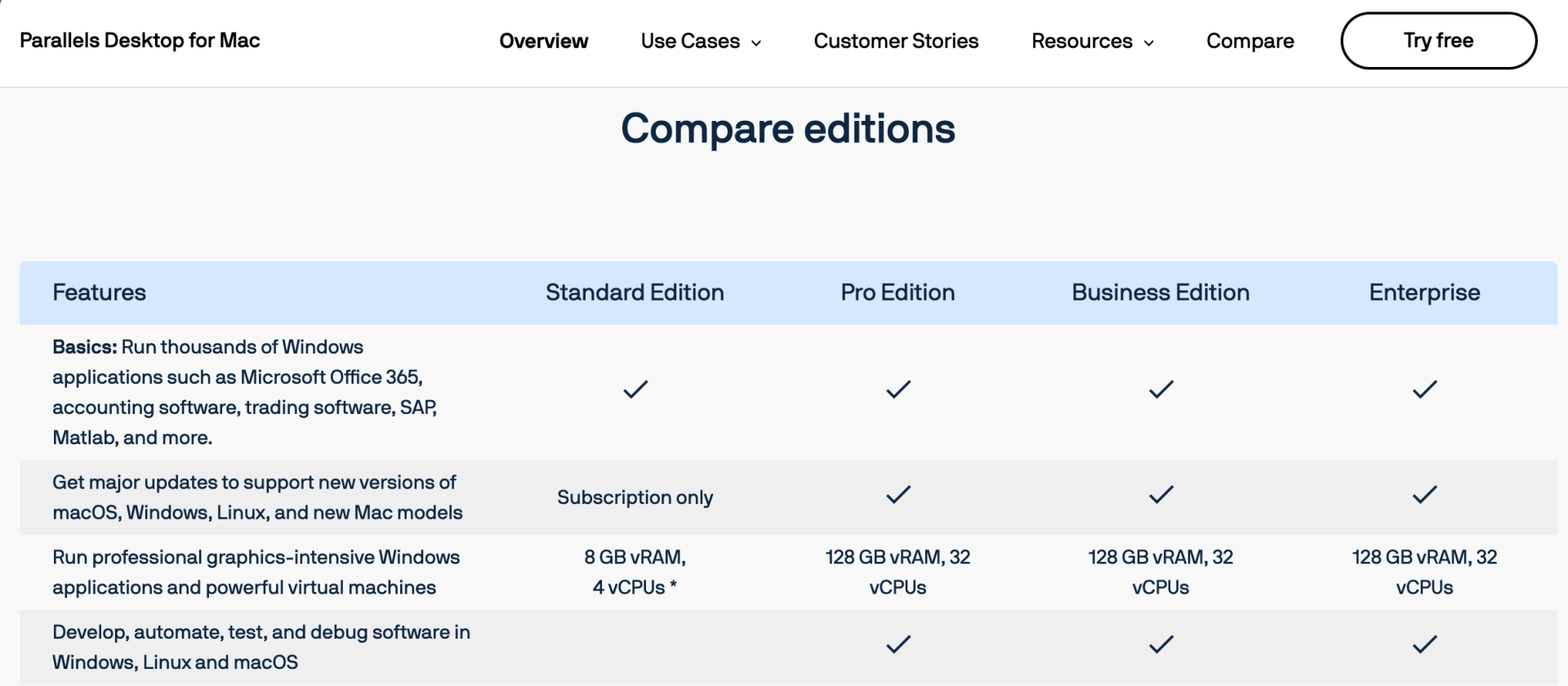
The next issue I ran into: The Parallels Desktop Standard edition only supported 8GB of RAM, and I ended up needing more than that (running 3-4 instances of Visual Studio, each running/debugging separate solutions takes a toll), so I was forced to upgrade to the “Pro” edition so I could get to 16GB of RAM:
It’s also worth noting that nested virtualization is not supported by either Parallels or VMware on MacOS, because Apple doesn’t support it on MacOS. That means features like the Windows Subsystem for Linux and anything that leverages Virtualization-Based Security (VBS) won’t be able to run. Fortunately, that’s no big deal for me. In cases where I need nested virtualization (e.g. for WSL-related tasks), I have a separate Hyper-V server that I can connect into.
But those are really the only issues I’ve run into (well, not counting the time I accidentally overwrote my VM’s hard disk running some errant code within the VM itself, but that issue was self-inflicted). The experience overall has been very good and I’d do it again in a heartbeat. Maybe at some point I’ll consider a Snapdragon X Elite-based machine, but for now I’m happy with the MacBook Pro.



 Out of Office Hours
5 responses to “Developing on Windows 11 ARM64, one year in”
Did you happen to look at trying with VirtualBox to see how the experience was?
LikeLike
Just about to get an ARM64 Macbook myself. Was curious whether you tried with VirtualBox to see if it had similar issues or different ones as the commercial VMs?
My coworkers using arm-macs for c#/mssql dev have had heaps of trouble with the mssql side of things too, so curious how others solved it ahead of getting the new Mac 😄
LikeLike
I’ve used VirtualBox in the past on Intel MacOS and hated it (it makes VMware look refined), so I never tried on the new ARM64 Mac.
LikeLike
Thanks. I’m still investigating this myself, and currently on a 2018 i7 MacMini w/ 64GB of RAM. Great to know your findings. Thanks.
LikeLike
thank you from Russia!)
LikeLike