

Sometimes I would like to try something and have it “just work.” Today was not one of those times. The task was simple: I want to try to use CMPivot to query information from my VMs. Step #1: Launch CMPivot from the ConfigMgr admin console. Nothing happens.
Checking the event log on the computer, I can see that it is crashing:
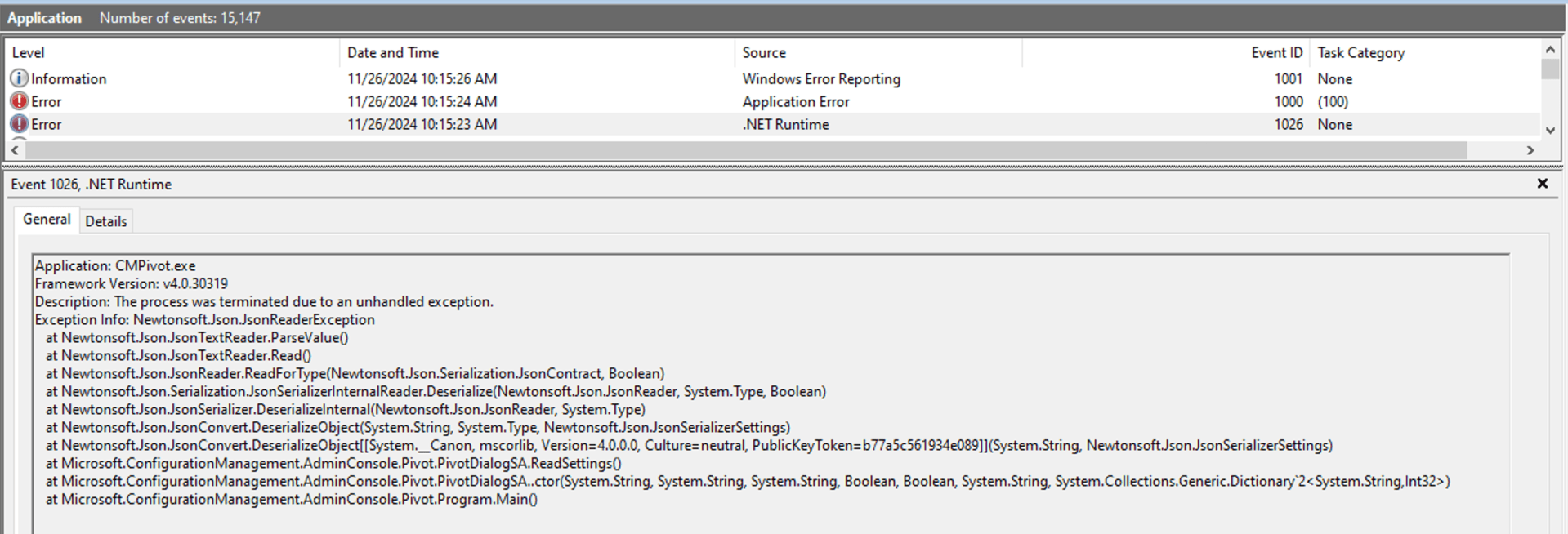
OK, it’s struggling to read JSON settings from somewhere. That’s also confirmed in the CMPivot.log:

But that doesn’t help with what settings. After a few ProcMon traces, I could narrow it down to the %AppData%\Microsoft\ConfigMgr10\CMPivot.dat file. Weird, because that file is not a JSON file, it’s a binary file:

But it was the last thing that was read before the crash, so it’s involved somehow. Let’s try deleting it, since it should get recreated anyway. And presto, CMPivot launches again:

Problem solved, right? Not completely. If I close CMPivot (without even doing anything), it will rewrite the file as expected. But when I then try to open CMPivot again, it crashes again — the same error. So each time I want to use it, I need to delete the file before launching it. Sigh.
Granted, this may only be occurring in the Tech Preview 2405 release that I am presently running. And maybe the next tech preview release will fix it (within the next 10 days please, since the preview build is getting near the end of its 180-day validity — we need a new build).




2 responses to “CMPivot crashing on startup? Maybe it’s config file is messed up.”
Greetings, I had the same issue after upgrading to build 2409. Thank you for this fix. I hope the next hotfix resolves the issue for good.
LikeLike
It seems to be a persistent issue with the 2409 release.Just completed the early ring update and its one and done for CMPivot.
LikeLike