
Yes, Windows 11 24H2 is available to everyone (after being ARM64-only for a few months). As usual, there are a number of related items updated at the same time:
- A new ADK version. Technically this was released back in May with the release of the Snapdragon X Elite-based machines and the Windows 11 24H2 ARM64 bits. There are no significant changes with this release. This is supported by ConfigMgr 2403 or above, and works fine with MDT as well (even if MDT doesn’t support Windows 11 at all).
- A new Group Policy settings spreadsheet that lists what’s new in 24H2. This shows 90 new settings, but it’s difficult to scan that list to determine what is indeed new versus just tweaked — review the list yourself to see if there is anything particularly interesting. A few that stand out to me: a setting to turn off the Recall screenshot capture (on Copilot+ PCs that support it in the first place), a setting related to the new “sudo” feature, a setting to control Defender updates during OOBE, and a bunch of settings around LanMan and SMB (helping to turn off old stuff).
- New GPO templates to update your Group Policy central store (or you can just copy them from a 24H2 machine).
- A new 24H2 security baseline to tell you how to properly secure Windows 11 (since it doesn’t ship that way by default, sigh).
What is available that you should ignore? The new Windows 11 Enterprise LTSC 2024 release. Just stick with the normal annual releases, which are supported for 36 months versus 60 months for LTSC. With 36 months, you can get away with an every-other-year upgrade cadence; adding the LTSC release would let you wait longer, but otherwise there are no advantages. (Sure, there are some use cases where LTSC makes sense, but not for information worker devices.)
What isn’t available? There is no enablement package, because this release requires a full OS swap (in-place upgrade) regardless of whether you are coming from Windows 10 or Windows 11 (22H2/23H2). Also, there is presently no support in Microsoft Configuration Manager, but that is likely to come soon, perhaps next month. (Intune doesn’t state one way or another, so I would assume that existing stuff will work but new policies are likely to be delivered later.)
You can read more about it in various posts, videos, etc.:
- Windows 11, version 24H2: What’s new for IT pros. Microsoft’s blog post with IT pro-focused details.
- Known issues in Windows 11 24H2. Microsoft’s list of acknowledged issues in 24H2 — check this regularly. It may not contain all issues, especially in the enterprise space, but it’s still working checking.
- What’s new in Windows 11 24H2. The “non-Microsoft” overview from Jon Towles, walking through the interesting changes in 24H2.
- Deep dive into Windows Sudo. Jon digs deeper into the new “sudo” feature in 24H2 that lets you limit the time you run elevated, reducing the risk to the device/environment.
- DirectAccess fails on Windows 11 24H2. If you are using DirectAccess, follow Richard Hicks’ site for the latest.
- Deprecated features in Windows 11 24H2. These features will be removed at some unknown future date. Items of note (the majority of which had been disclosed previously): VBScript, DirectAccess, Step Recorder, WMIC.
- Removed features in Windows 11 24H2. Unless you are going to miss WordPad, nothing really new here.
If you are the visual type, you can also check out Jeremy Chapman’s YouTube video:
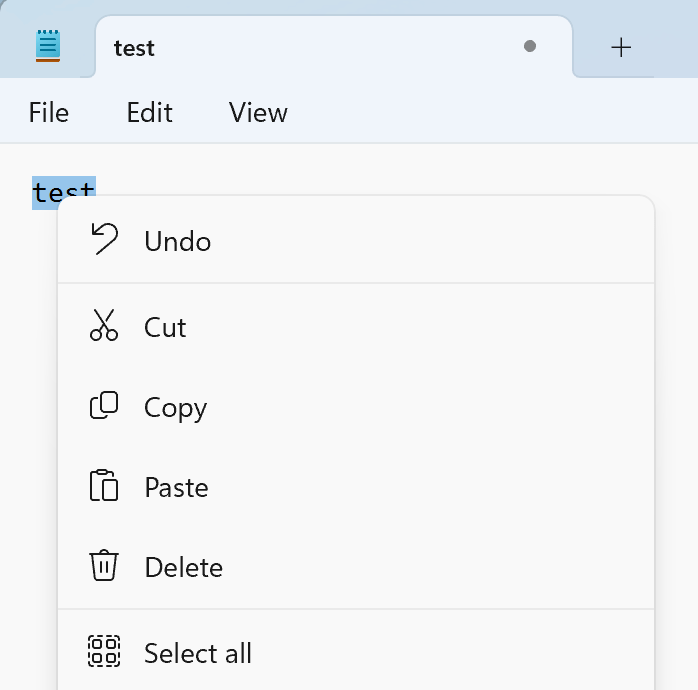
My favorite 24H2 feature: text labels on right-click menus.
But…
If you’re running Windows 11, there’s really no rush to deploy this. Windows 11 23H2 will be supported through October 2026.
If you’re on Windows 10, it’s a much different story: You have until October 14th, 2025, to get off of Windows 10. If you haven’t started that migration yet, you should just move to the latest version, right? Well, for larger orgs that’s a significant risk — any issues you encounter may cause delays in the migration, and if you miss the deadline, your only option is to write Microsoft a check for extended servicing so that you can keep getting security updates until you are finished migrating the machines. That could be a big check, as I discussed earlier in the year.
Remember, if you aren’t yet on Windows 11, that should be your #1 and really your only priority for the next year. Trying to go cloud-native at the same time? Even Microsoft says that’s a bad idea, from their post:
“Your transition to the cloud, while related, shouldn’t delay or be delayed by your Windows 11 rollout.”
Maybe if you started that process one or two years ago, fine, but starting now is way too risky at this point (unless maybe you only have hundreds of devices to worry about, not 10’s or 100’s of thousands).
Overall, the process for moving from Windows 10 to Windows 11 should be well understood by organizations — you’ve done it in the past with Windows 10. Maybe you’ve gotten rusty, since you’ve had the convenience of only having to deal with enablement packages on Windows 10 for 3+ years. Well, dust off those processes and get to it.

 Out of Office Hours
12 responses to “Windows 11 24H2 is available, but…”
Thanks Michael!! One other consideration, ConfigMgr 2403 does not officially support Windows 11 24H2 yet as seen here. I do not believe its expected to be supported until ConfigMgr 2409 which has yet to be announced.
LikeLike
Thanks, yes, I intended to check that and forgot – I’ll add a note.
LikeLike
Hi! I’ve been using your UpdateOS script at my work no issues. For 24H2, the script doesn’t update properly – I have a VM with the septepmber build (26100.1742). running the script in autopilot gets the defender updates but doesn’t update it to the latest October build (26100.2033)
This only happens in 24h2. Using the script during autopilot for 23H2 works like a charm. What’s even more interesting is using the script on 24h2 while at the desktop in powershell pulls down the correct update, but this does not occur in autopilot.
LikeLike
Michel, Windows 11 23h3 PRO will be supported through September 2025, correct?
LikeLike
Yes, 24 months for Pro and 36 months for Enterprise/Education. So Pro 23H2 ends 11/11/2025 and Enterprise 23H2 ends 11/10/2026. https://learn.microsoft.com/en-us/windows/release-health/windows11-release-information#windows-11-current-versions-by-servicing-option
LikeLike
Thanks Michael. In your opinion, would this migration path be correct?
W10 22h2 —–wsus—->W11 23h2——wsus—->W11 24h2
or W11 24h2 is not possible to upgrade with wsus in any way?
LikeLike
You could do that, yes. Or you could go W10 22h2 directly to W11 24h2. Either way is possible, but going to 23h2 now and 24h2 at some point in the future is lower risk if you are licensed for Enterprise. If you only have Pro, you might as well go directly to 24h2 at this point, otherwise you’ll have less than a year to get from 23h2 to 24h2.
LikeLike
Thanks again Michael. But, if I understood you correctly, it is not possible to upgrade to 24h2 via WSUS. Is that right?
We have already done several upgrades from Windows 10 22h2 to Windows 11 23h2 using WSUS with very good results, but I understand from reading your article that we could not use WSUS to do it on 24h2.
LikeLike
You can’t use an enablement package to get to 24H2. But you can do a full in-place upgrade (OS swap) via WSUS.
LikeLike
Thanks Michael for this very interesting blog, I was scratching my head why Feature Upgrades to 24H2 don’t work in our Config Manager environment, now I know….
LikeLike
To be clear, any full OS upgrade from any version of Windows 10 to any version of Windows 11 will always need to be a full OS upgrade. So far unless I’m mistaken in WSUS there does not seem to be any feature enablements from 10 to 11, and similarly from any earlier Win 11 feature versions to newer Win 11 feature versions.
LikeLike
Right, from 10 to 11 is always a full OS upgrade. There is an enablement package to get from Windows 11 22H2 to Windows 11 23H2, but not to 24h2 — that’s always a full OS upgrade (OS swap).
LikeLike