
Now that my “real” lab tenant has been updated, I can easily try it out. I set up a new unregistered VM, created a new Autopilot device preparation profile that targeted “All users” with a number of apps linked to it, and started the process. As expected, I saw the EULA page; since I was running Windows 11 Enterprise, it didn’t ask for personal vs. work/education. Shortly after logging in, it failed:

OK, that’s expected because my tenant is blocking enrollment of personal devices. (If you look up the 80180014 error code at the https://www.microsoft.com/mdmerrors page, you’ll see it just says “device not supported.” That’s a generic message, probably better described as “some enrollment restriction failed.”) To get past that, I changed the setting:

That got everything going. The apps installed, and ESP showed a notification that the process was complete. After that, it prompted me to confirm privacy and security settings (seems odd that isn’t suppressed), and then something unexpected happened: It started installing “feature and security updates.” Since this is a 24H2 device, I wasn’t too concerned about the “feature update” part of that, but it was interesting to see this:

Is that part of Autopilot device preparation, or is that a new OOBE feature? And can I turn it on and off if I want? Hard to say, hopefully we’ll see some documentation soon.
A couple of other observations: I didn’t actually see the device added into the Entra ID group until after the “process is complete” notification. I suspect that’s just a lag in Entra ID. I also didn’t see the device in the new Autopilot device preparation report until after it was already done, so it was definitely lagging behind:
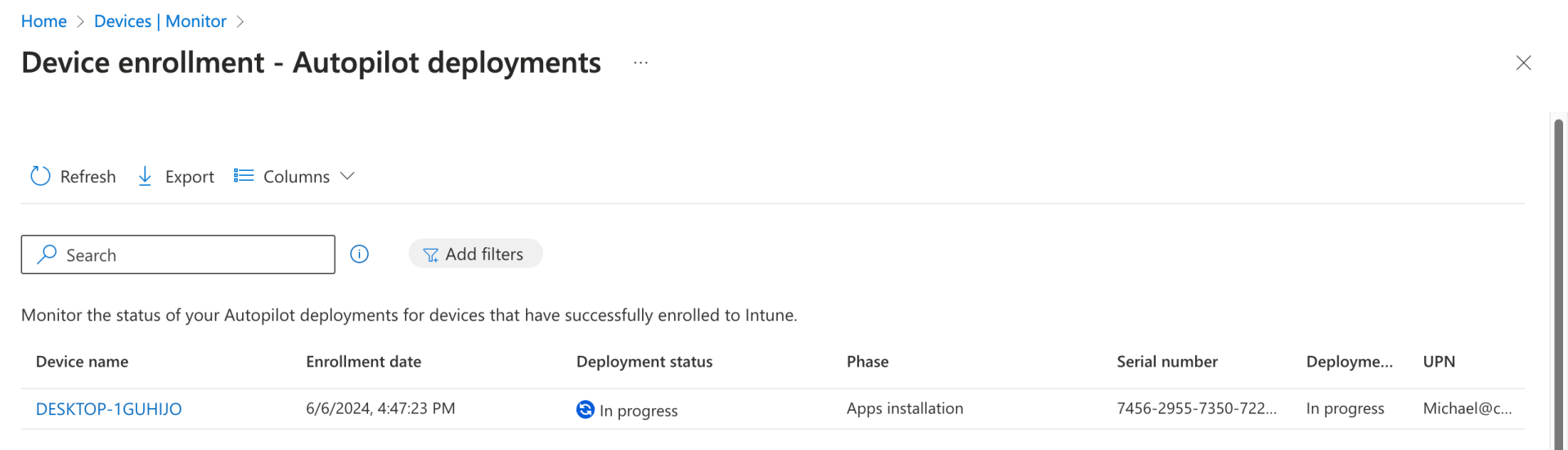
The progress finally changed to “Success” at about the same time the updating process initiated a reboot. It showed the process taking six minutes, but that doesn’t include the additional time that the updating consumed.

But given that the updating took about 8 minutes, that means that a six-minute deployment didn’t show up until after the process was complete.
Another point worth mentioning: After the device was enrolled in Intune, it was marked as a corporate device. So while it fails if you don’t enable personal device enrollment, it does get marked as a corporate device afterwards. That’s somewhat interesting, since the user could enroll any device they want.
After the reboot, I could manually log in and see what was on the device. But I noticed that not all of my apps were present — some were, as I saw the result (e.g. PacMan) during the process, but some were missing. Looking at the Autopilot device preparation report, I could click on the device name and see this in the details:

OK, so it skipped three of the apps that I had specified. But why where they skipped? It turned out that there was a simple answer to that: They weren’t assigned to either the group associated with the Autopilot device preparation profile or to “All devices” — in fact, they were not assigned at all. So that’s a nice touch: it’s telling me that yes, I had listed seven apps in the profile, and it installed the four that were actually targeted, but the others were purposely skipped because they weren’t assigned.
Here’s the full experience:


 Out of Office Hours
49 responses to “Windows Autopilot v2 experience: Some surprises (including updates)”
Does it remove the device from the group after provisioning is finished?
LikeLike
No it doesn’t.
LikeLike
that sucks 😦
LikeLiked by 1 person
Any issues with using Autopilot v1 for production systems and creating profiles, etc in Autopilot V2 to evalaute v2?
LikeLike
No. Devices where you’ve uploaded a hardware hash will go down the v1 route; devices that don’t have a hardware hash with a user that has a v2 profile assigned to them will go down the v2 route.
LikeLike
Interesting that it jumped from 6 to 100% instantly – way to have people lose all respect for those progress indicators (if they ever had any…)
LikeLike
Pretty sure the updates page is a part of standard OOBE – I’ve observed it on a number of non Intune devices in the last 2 or 3 months.
LikeLike
That was my initial thinking too, since it was after the v2 ESP experience. But I wanted to give them the benefit of the doubt 🙂
LikeLike
Thanks!
LikeLike
What does you automatic enrollment look like that this device would have been set to use? I believe there is a setting to make it an autopilot device therefore that might account for the delay.
LikeLike
Not sure what you’re referring to here.
LikeLike
I think this is what I was referring to with why your devices were not showing up in Entra until after they were finished. https://learn.microsoft.com/en-us/autopilot/tutorial/user-driven/azure-ad-join-automatic-enrollment#set-up-windows-automatic-intune-enrollment
LikeLike
Ah. No, that has nothing to do with it — it’s just a lag in Entra ID/AAD before you can see the membership (the joys of a multi-master/replicated identity DB). From an Intune perspective, the device is a member of the group and everything works fine, you just can’t see it in the admin portal until later.
LikeLike
Take a look at your Windows Autopilot user-driven deployment. I believe there is a setting in there.
LikeLike
Have you started thinking about how to lock down users from being able to register devices?
My guess is Corporate Identifiers but figured if you have considered anything else.
Hoping Microsoft will make it a little easier than that but worst case that isn’t the worst thing.
LikeLike
Corporate device identifiers appear to be the plan.
LikeLike
What about a device name? There is no way how to set it up?
LikeLike
You could push out a rename computer policy which supports the same naming patterns as Autopilot (not surprising because it’s the same thing that Autopilot uses behind the scenes). Microsoft hasn’t mentioned any other plans around this.
LikeLike
Which policy? You mean bulk device action? Not exactly a enterprise solution… Hope that MS improve it somehow.
LikeLike
Can you still domain join or is it just Azure Ad joined?
LikeLike
Are you able to setup domain joining or is it just for Azure AD joined?
LikeLike
AAD only. For HAADJ, you have to continue using Autopilot v1.
LikeLike
Hi!
I’m having issues with the Device Goup to add in the Device Preparation policies. I’ve created an Entra ID group, the owner is “Intune Autopilot ConfidentialClient” (the only i have), but when saving the Policy after refresh it always says that there’s no grupo assigned. Conclusion, the apps do not install and the device does not get to the group.
LikeLike
Probably a good support case to file. When I edit my existing device preparation policy, I do see “0 groups” for a split second before it updates to show that I have one group assigned.
LikeLike
I am getting the exact same issue. Tried a new group but still the same.
One thing I don’t have is the tuple option on the CSV upload. I don’t know if this means my tenant isn’t fully compatible with device prep and this is why it’s failing the group assignment. What about your tenant, do you have this option?
LikeLike
They’ve temporarily removed the corporate device feature from all tenants.
LikeLike
I know they have disabled the feature (didn’t know it was removed) but what I am asking or wondering is if this might be why I (and Redfield) cannot assign the device group to the policy successfully.
LikeLike
No, it’s still working fine for most people.
LikeLike
What build of 24H2 are you testing with, Michael?
LikeLike
26100 (VM created with the Insider release preview ISO).
LikeLike
Anyone experience issue device not automatically added to device group created?
LikeLike
Yes. Thought I had done something wrong but have gone over it again and still not adding it.
LikeLike
Does the device still need to be manually enrolled via a serial number or anything?
I used to have to do a hardware hash, now I’m doing nothing – but I’m not getting the new screen.
LikeLike
You need the device preparation policy targeting the user that will be joining the device; it references a device group that the new device will be added to. No registration or hardware hashes are required. You also need Windows 11 24H2, or a patched version of Windows 11 22H2 or 23H2 (April patch Tuesday or later).
LikeLike
When I reset a device it is not adding it to the group automatically or setting up the device. Any ideas?
LikeLike
Everything happens after the user signs in during OOBE. That joins the device to AAD/Entra ID and enrolls it in Intune. If there is a device preparation policy that targets the user, then you should see the new ESP/progress UI and the device should be added to the group.
LikeLike
Have been working with Microsoft on this today. They still aren’t 100% sure how it works but they said it needs to be done on 24H2. I have tried today on 23H2 and it didn’t work. Downloaded 24H2 and it has worked straight away.
LikeLike
It’s supposed to work on Windows 11 22H2 and 23H2 as well as long as they’ve been pre-patched to late April/early May’s cumulative update.
LikeLike
I tried a 24H2 ISO, and indeed I do get the new screen now.
Unfortunately failing for me every time.
The device shows up in my dynamic device group for autopilot.
Tried with and without deploying apps, no scripts, still fails with error “We can’t complete device setup”.
In the intunemangementextension.log
[Failed to get AAD token. len = 34 using client id fc0f3af4-6835-4174-b806-f7db311fd2f3 and resource id 26a4ae64-5862-427f-a9b0-044e62572a4f, errorCode = 3399548929]
[AAD User check is failed, exception is Intune Management Extension Error. Exception: Microsoft.Management.Services.IntuneWindowsAgent.AgentCommon.TokenAquireException: Attempt to get token, but failed.]
LikeLike
That error isn’t an error, it’s quite normal during OOBE. If you’ve got a full log, feel free to e-mail it to me at michael@oofhours.com and I can take a look. I’ve certainly never seen it fail like that; it could take more logs to figure it out (e.g. cab created by “mdmdiagnosticstool.exe -area Autopilot -cab c:\autopilot.cab”).
LikeLike
Hi Michael,
Great write up! However, Im running into the same issue each time I attempt to provision a device. Im presented with the same “We cant complete device setup” notification that Josh is getting.
Looking at the logs, I see the same failures that Josh is seeing. The provisioning policy is pretty vanilla with no apps or scripts being deployed so I’m curious why the failures when others seem to have success.
I sent you the logs and am hoping you may have a chance to review and get back to me. Appreciate it!
LikeLike
The errors in the log are showing Intune returning a “500 internal server error” each time it tries to get the list of Win32 apps that needs to be installed. It tries a number of times before it gives up and returns the error. That’s obviously not normal, and is probably a good support case to open via the Intune portal.
LikeLike
Hi Michael, I have the same issue… I have a lot pf tests and sounds like some tenants have experiencing the same issue…
Maybe the Tenant Location (Azure Zone)?
LikeLike
Interesting to know where it went. I am getting exactly the same issue with W11 23H2 (May 2024 media) including “500 internal server error” accessing win32 apps…
LikeLike
Interesting… I added Adobe acrobat to Allowed Applications and published it to a group containing the test machine. After that provisioning finished successfully…. Either Autopilot is in a good mood today or Device Preparation should have at least one application added?
LikeLike
Hi Michael, Same error, after some tests, if I use the en-us version of W11, all works fine, but if I use the es-es version of W11 I get the same error as described (tested in different tenants and different VM environments) I hope this trick can help others. Best regards.
LikeLike
I noticed that Rudy Ooms saw the same thing with de-de. Let’s hope it’s something that Microsoft can fix reasonably quickly.
LikeLike
If Hardware hashes aren’t needed anymore and the Windows device that is set up with Autopilot v2 doesn’t check what tenant it is a member of until the user signs in to it, what is to stop a malicious employee from signing in to the corporate windows device using their personal Microsoft account credentials.
Am I missing something?
LikeLike
At present, no, you aren’t missing anything. There is a “tenant binding” feature mentioned in the original Autopilot v2 announcement that we *hope* will address that issue by tagging the device with the tenant details, but we’ll have to wait to see how that works.
LikeLike