
Sometimes I should probably pay more attention. I use PowerShell a lot. I use Windows 10 a lot. But I still missed this one:
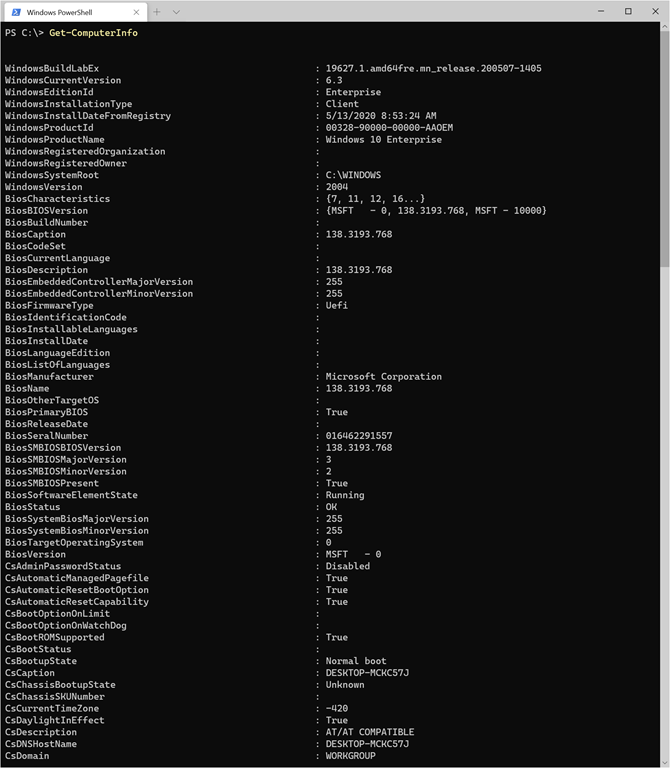

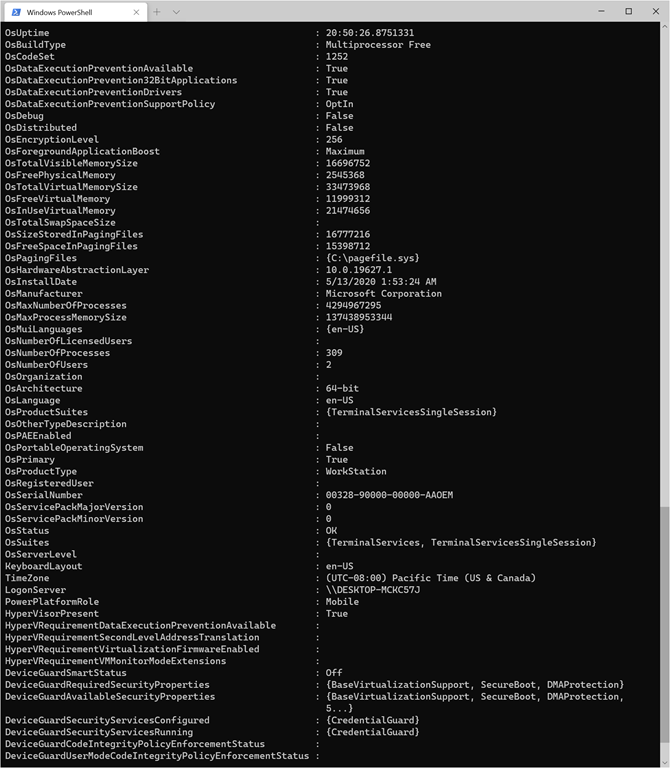
Some highlights:
- Want to know if the device is joined to AD? Check CsPartOfDomain. Want to know what domain? Look at CsDomain (which will be WORKGROUP on an AAD-joined device).
- Need to know if the device is UEFI or not? Check to see if the BiosFirmwareType is Uefi.
- Want to know how long Windows has been running since the last reboot? Check OsUptime or OsLastBootUpTime.
- How about the Windows SKU? OsOperatingSystemSKU will tell you that.
- Need to get a list of languages that are installed? OsMuiLanguages has that list.
Overall, it’s kind of like MSINFO32 but in PowerShell, and then some. Sure, you can find all of this stuff elsewhere (multiple cmdlets, WMI, registry locations, etc.) but remembering one cmdlet is much easier.


 Out of Office Hours
9 responses to “The most useful PowerShell cmdlet I didn’t know existed”
Nice! Needed this “one stop shop” for some image logging I was scripting, perfect timing!
This is like when someone told me the computer name was in the default Windows File Explorer window in Windows 7 – my reaction was “when did they put that in there?!” and if course it was always there under my nose. By the way this was something I missed in 8, 8.1 and all the 10 builds.
LikeLike
Ugh… I too use powershell everyday and also missed this little gem!
Thanks for pointing it out!
LikeLike
In general I feel like PowerShell is a multi-acre field of ester eggs like this one that is both rewarding and frustrating all at the same time. Thanks Mike.
LikeLike
The caveat being, this only works on Windows 10 and newer, doesn’t work on Server 2012/R2 or Windows 8.1
LikeLike
Someone still uses those? 🙂
LikeLike
[…] The most useful PowerShell cmdlet I didn’t know existed […]
LikeLike
Any idea why most of my data (Win10 Ent) would come back blank? Ran Powershell as administrator but it didn’t make any difference. I ran it on a Win Server (Win Sever 2016) in my VMWare system and the majority of the data populated.
LikeLike
I believe it uses WinRM for some collection, so perhaps that’s disabled?
LikeLiked by 1 person
That was it! WMI was running but not WinRM. Thanks!
LikeLike